January 12, 2026

5 Last-Minute Valentine’s Gifts That Are Actually Thoughtful (Instant Download) ⏰ Valentine’s Day Countdown: 32 Days 0 Hours Left | 🎁 Limited Time: Save 20% on […]



Clear definition: The 50/30/20 rule = 50% Needs, 30% Wants, 20% Savings/Debt, based on after-tax household income.
Couples-first approach: Use proportional splits or the three-account method to keep things fair and calm.
Google Sheets SOP: Build Setup → Transactions → Budget → Dashboard in ~45 minutes with dropdowns, SUMIFs, and conditional formatting.
Flex for 2025: In high-cost areas, adjust to 60/30/10 temporarily; automate small increases in saving.
Template included: Copy our FamilyBridge Google Sheets template directly into your Drive (see below).
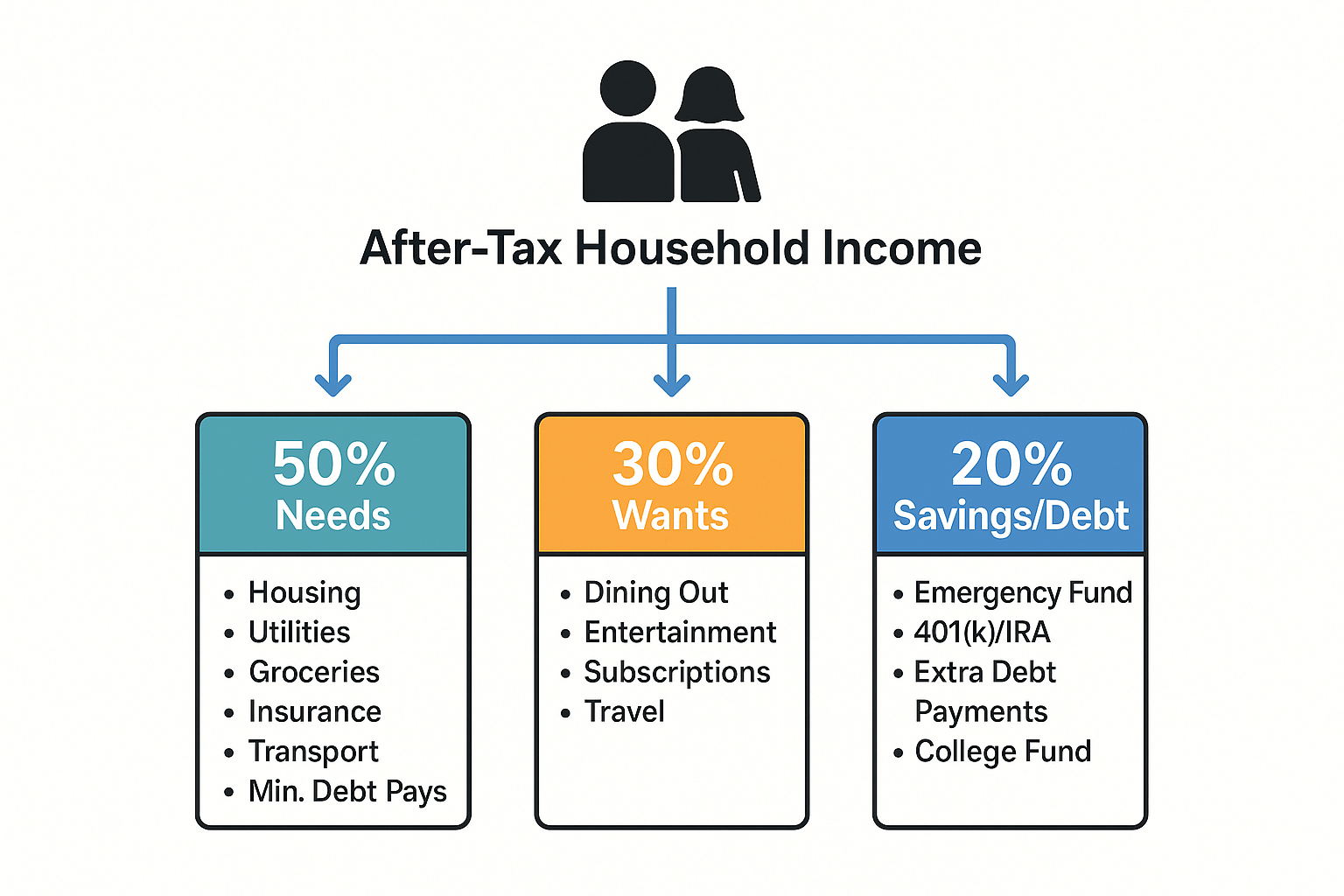
Definition: The 50/30/20 rule divides a couple’s after-tax household income into 50% needs, 30% wants, and 20% savings/debt payoff; it’s a flexible framework rather than a rigid law.
Why couples care: You’re juggling rent, daycare, debt, and two paychecks. A shared, living spreadsheet turns the rule into a weekly system you both can see, adjust, and trust.
After-tax income only. Build the rule on the dollars that actually hit your bank accounts. If your employer auto-withholds retirement contributions, your “net” is smaller; additional contributions can still count toward the 20% goal.
It’s adaptable. High-cost cities or pricey childcare may push Needs above 50%. Running a 60/30/10 split for a season is fine if you set a path back toward 20% saving.
Anchor to reality. Compare your categories (housing, transport, food, insurance, childcare) to your own past months and national norms; large gaps are coaching moments, not failures.
Pro tip: If you can’t hit 20% yet, lock in 10–15% automatic saving and step up by +1–2% each quarter.
Agree on how to fund the 50% Needs bucket and, if you want, some Wants.
50/50 split: Simple, but feels unfair when incomes differ a lot.
Proportional to income (recommended for many): Each partner pays the same % of their income toward joint needs. This scales automatically when incomes change.
Category split: “You cover rent, I cover groceries.” Works if categories are stable—review quarterly.
Hybrid: Mix methods and revisit at life changes (new job, move, baby).
The three-account setup: Each partner keeps an individual account + one shared account. You both contribute to the shared account per your method; the spreadsheet calculates how much and when. Weekly money check-ins keep tensions low.
👉 Get the free template: /templates/couples-50-30-20-google-sheets
(Click “Make a copy” to save it into your own Google Drive.)
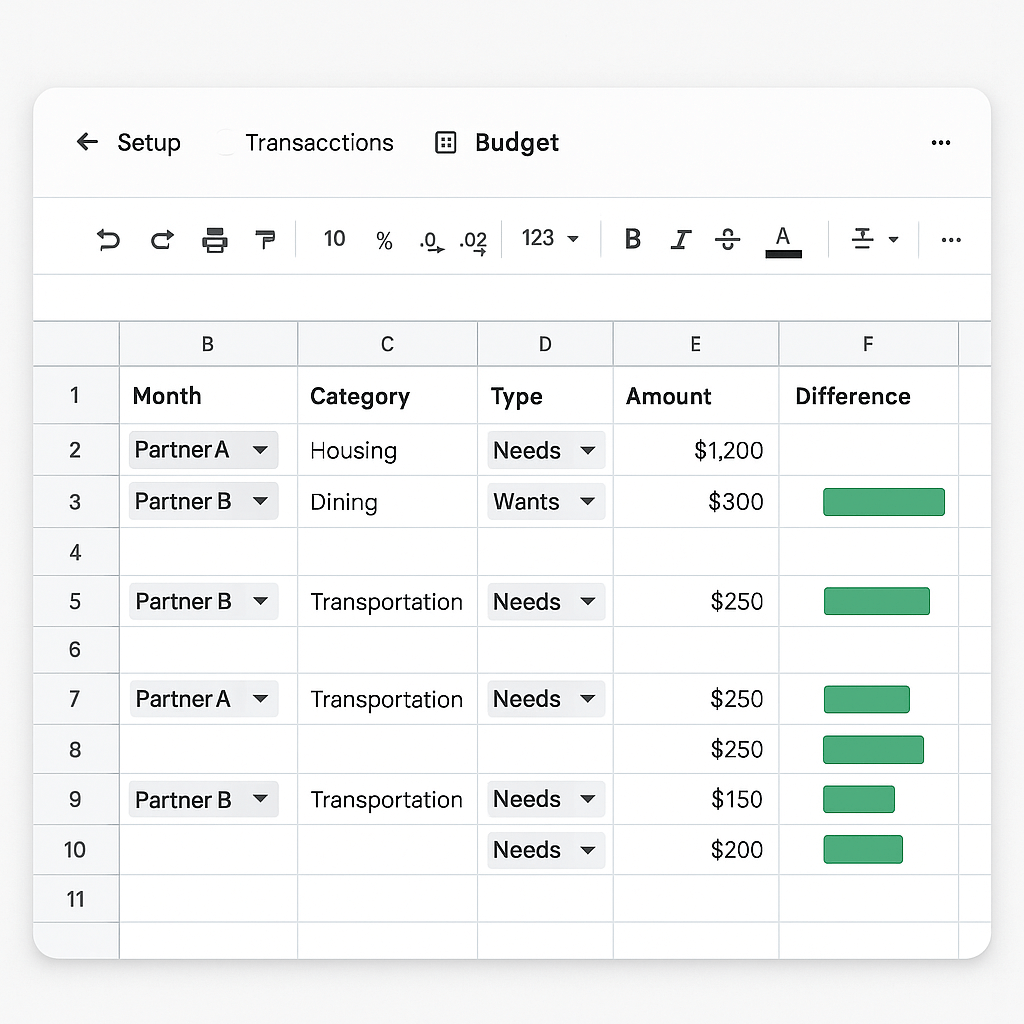
Below is a screenshot preview so you know what to expect:
(Insert screenshot of Setup / Transactions / Budget / Dashboard tabs with visible dropdowns and conditional formatting.)
Create a new Google Sheet named “FamilyBridge Couples 50/30/20”.
Add four sheets: Setup, Transactions, Budget, Dashboard.
| Cell | Field | Example |
|---|---|---|
| B2 | Partner A after-tax monthly income | 5,800 |
| B3 | Partner B after-tax monthly income | 3,700 |
| B5 | Split method | Dropdown: 50/50, Proportional |
| B7 | Total after-tax income | =B2+B3 |
| B9–B11 | 50/30/20 targets | Needs =B7*0.5 ; Wants =B7*0.3 ; Savings =B7*0.2 |
How to set dropdowns (data validation):
Select B5 → Data → Data validation → Dropdown → add options 50/50, Proportional.
Create similar dropdowns later in Transactions for Partner and Type.
Columns (A–F): Date, Partner, Category, Type, Amount, Notes
Partner dropdown: A or B.
Type dropdown: Needs, Wants, Savings/Debt.
Category examples: Rent, Utilities, Groceries, Insurance, Transport, Childcare, Dining Out, Subscriptions, Emergency Fund, Debt Extra, etc.
Data entry tip: Keep a rolling “Category” list on the Setup sheet and use it as the source for a dropdown, so spelling stays consistent.
Add these named ranges for readability:
tx_amount → Transactions!E:E
tx_type → Transactions!D:D
tx_partner → Transactions!B:B
Optional: tx_category → Transactions!C:C
Actual totals by bucket:
Needs: =SUMIF(tx_type,"Needs",tx_amount)
Wants: =SUMIF(tx_type,"Wants",tx_amount)
Savings/Debt: =SUMIF(tx_type,"Savings",tx_amount)
Variance vs targets:
Needs variance: =Actual_Needs - Setup!B9
Wants variance: =Actual_Wants - Setup!B10
Savings variance: =Actual_Savings - Setup!B11
Conditional formatting (early warning system):
If Actual_Needs > Setup!B9, highlight the cell red; if <= target, highlight green.
Do the same for Wants and Savings.
Add a “Status” column with a simple formula like =IF(Actual_Needs>Setup!B9,"Over","On Track").
On Budget, calculate contributions.
If 50/50: each contributes =Setup!B9/2 to joint Needs (and any shared Wants if you choose).
If Proportional:
A share % = =Setup!B2/Setup!B7
B share % = =Setup!B3/Setup!B7
A dollars to joint Needs = % * Setup!B9 ; B likewise.
This ensures each contributes the same % of their income toward the joint bucket.
Donut charts for Needs/Wants/Savings vs targets.
Progress bars: Use conditional formatting on cells showing % of target met.
Monthly trend (optional): Use a pivot table on the Transactions sheet grouped by month and Type.
Sharing & protection tips:
Give both partners edit access; lock the Setup sheet and formula ranges.
Keep the Transactions tab as the main place to edit to reduce errors.
💡 Editor’s note (real-world experience):
When I first tested this with my partner, I forgot to lock the Setup tab. Within a week, a formula got overwritten and broke the dashboard. Since then, I always “Protect range” for formulas and keep only the Transactions tab open for editing. This small step prevents headaches.
If rent + childcare push Needs to 55–65%, formalize a temporary 60/30/10 plan and schedule a review (lease renewal, next raise, end of daycare). The rule is a direction, not dogma—treat deviations as a season with an exit plan.
Base your monthly target on a 3-month average net pay.
Send windfalls (bonuses, tax refunds) directly to the 20% bucket.
Tag bonuses as “Income–Variable” to keep them visible in the Dashboard.
If you carry high-interest debt (>15%), prioritize accelerated payoff within the 20% slice.
Still aim to capture any employer match in retirement accounts.
If you’re far from 20% saving, start with 10–15% and ratchet up.
Sanity check: Compare your spend mix to your past 6–12 months. Use the Dashboard trend to spot the one or two categories that drive most overruns.
Scenario:
Partner A nets $5,800/mo; Partner B nets $3,700/mo; Total $9,500/mo.
Targets: Needs $4,750; Wants $2,850; Savings/Debt $1,900.
Split method: Proportional.
Fair-share math:
A share = 5,800 / 9,500 = 61.05% → A funds Needs ≈ $2,899.
B share = 38.95% → B funds Needs ≈ $1,851.
Optionally split some Wants proportionally (e.g., date nights); keep personal hobbies in individual accounts.
Three things that broke the budget & the fixes
Needs at 58% → Negotiate rent at renewal; shop auto insurance; re-tag two subscriptions to Wants and cut one.
Savings only 14% → Automate an extra $100/week to HYSA; funnel A’s first $2,000 of bonus into the emergency fund.
Partner friction → Weekly 15-minute “money check-in” (agenda: transactions, overage flags, next week’s big purchases).
Q: Is the 50/30/20 rule after-tax or before-tax?
A: After-tax (net) income. Use the dollars that actually reach your accounts.
Q: We’re in a pricey city—can we use 60/30/10?
A: Yes. Treat it as a temporary adjustment and set review dates to work back toward 20% savings.
Q: How do retirement contributions fit?
A: Pre-tax payroll deferrals reduce your “net” and effectively contribute to long-term savings. If there’s a match, try not to leave it on the table.
Q: What belongs in “Needs”?
A: Housing, utilities, basic groceries, insurance, transportation, and minimum debt payments—the expenses required to live and work.
Q: Why use Google Sheets instead of a static template?
A: Shared editing, transparent formulas, dropdowns, and conditional formatting give you real-time control and accountability.
Q: How often should we review?
A: Weekly 15-minute check-ins; monthly reset; quarterly % review—keep it short and consistent.
Agree on a split (50/50 or proportional) and the three-account setup.
Create the Sheets file & four tabs; lock formulas.
Add dropdowns (Partner/Type/Category).
Enter both after-tax incomes; auto-calculate 50/30/20 targets.
Log a week of transactions; fix mis-tags.
Turn on conditional formatting for overages.
Review Dashboard every Sunday; adjust categories; schedule a monthly reset.
Re-aim your percentages quarterly (e.g., 55/25/20 → 50/30/20).
Can 50/30/20 work if we have daycare and student loans?
Yes—tune to 55–65% Needs for a season and plan a glidepath back.
Do minimum debt payments count as “Needs”?
Yes; extra payments go in the 20% bucket.
How do we split fairly with unequal incomes?
Use proportional contributions so each partner pays the same % of income toward joint needs.
What about irregular/bonus income?
Base targets on a 3-month average; send windfalls to Savings/Debt first.
Do pre-tax retirement contributions “count” toward 20%?
They reduce net income and effectively contribute to long-term savings; still prioritize the employer match if available.
Where can I sanity-check our spending mix?
Use your Dashboard trends and past months to spot the outliers; adjust the biggest drivers first.
Analyzing Budgets (50–30–20 Activity) — CFPB
401(k) Limit Increases to $23,500 for 2025 — IRS (IR-2024-285)
Clear definition: The 50/30/20 rule = 50% Needs, 30% Wants, 20% Savings/Debt, based on after-tax household income.
Couples-first approach: Use proportional splits or the three-account method to keep things fair and calm.
Google Sheets SOP: Build Setup → Transactions → Budget → Dashboard in ~45 minutes with dropdowns, SUMIFs, and conditional formatting.
Flex for 2025: In high-cost areas, adjust to 60/30/10 temporarily; automate small increases in saving.
Template included: Copy our FamilyBridge Google Sheets template directly into your Drive (see below).
Definition: The 50/30/20 rule divides a couple’s after-tax household income into 50% needs, 30% wants, and 20% savings/debt payoff; it’s a flexible framework rather than a rigid law.
Why couples care: You’re juggling rent, daycare, debt, and two paychecks. A shared, living spreadsheet turns the rule into a weekly system you both can see, adjust, and trust.
After-tax income only. Build the rule on the dollars that actually hit your bank accounts. If your employer auto-withholds retirement contributions, your “net” is smaller; additional contributions can still count toward the 20% goal.
It’s adaptable. High-cost cities or pricey childcare may push Needs above 50%. Running a 60/30/10 split for a season is fine if you set a path back toward 20% saving.
Anchor to reality. Compare your categories (housing, transport, food, insurance, childcare) to your own past months and national norms; large gaps are coaching moments, not failures.
Pro tip: If you can’t hit 20% yet, lock in 10–15% automatic saving and step up by +1–2% each quarter.
Agree on how to fund the 50% Needs bucket and, if you want, some Wants.
50/50 split: Simple, but feels unfair when incomes differ a lot.
Proportional to income (recommended for many): Each partner pays the same % of their income toward joint needs. This scales automatically when incomes change.
Category split: “You cover rent, I cover groceries.” Works if categories are stable—review quarterly.
Hybrid: Mix methods and revisit at life changes (new job, move, baby).
The three-account setup: Each partner keeps an individual account + one shared account. You both contribute to the shared account per your method; the spreadsheet calculates how much and when. Weekly money check-ins keep tensions low.
👉 Get the free template: /templates/couples-50-30-20-google-sheets
(Click “Make a copy” to save it into your own Google Drive.)
Below is a screenshot preview so you know what to expect:
(Insert screenshot of Setup / Transactions / Budget / Dashboard tabs with visible dropdowns and conditional formatting.)
Create a new Google Sheet named “FamilyBridge Couples 50/30/20”.
Add four sheets: Setup, Transactions, Budget, Dashboard.
| Cell | Field | Example |
|---|---|---|
| B2 | Partner A after-tax monthly income | 5,800 |
| B3 | Partner B after-tax monthly income | 3,700 |
| B5 | Split method | Dropdown: 50/50, Proportional |
| B7 | Total after-tax income | =B2+B3 |
| B9–B11 | 50/30/20 targets | Needs =B7*0.5 ; Wants =B7*0.3 ; Savings =B7*0.2 |
How to set dropdowns (data validation):
Select B5 → Data → Data validation → Dropdown → add options 50/50, Proportional.
Create similar dropdowns later in Transactions for Partner and Type.
Columns (A–F): Date, Partner, Category, Type, Amount, Notes
Partner dropdown: A or B.
Type dropdown: Needs, Wants, Savings/Debt.
Category examples: Rent, Utilities, Groceries, Insurance, Transport, Childcare, Dining Out, Subscriptions, Emergency Fund, Debt Extra, etc.
Data entry tip: Keep a rolling “Category” list on the Setup sheet and use it as the source for a dropdown, so spelling stays consistent.
Add these named ranges for readability:
tx_amount → Transactions!E:E
tx_type → Transactions!D:D
tx_partner → Transactions!B:B
Optional: tx_category → Transactions!C:C
Actual totals by bucket:
Needs: =SUMIF(tx_type,"Needs",tx_amount)
Wants: =SUMIF(tx_type,"Wants",tx_amount)
Savings/Debt: =SUMIF(tx_type,"Savings",tx_amount)
Variance vs targets:
Needs variance: =Actual_Needs - Setup!B9
Wants variance: =Actual_Wants - Setup!B10
Savings variance: =Actual_Savings - Setup!B11
Conditional formatting (early warning system):
If Actual_Needs > Setup!B9, highlight the cell red; if <= target, highlight green.
Do the same for Wants and Savings.
Add a “Status” column with a simple formula like =IF(Actual_Needs>Setup!B9,"Over","On Track").
On Budget, calculate contributions.
If 50/50: each contributes =Setup!B9/2 to joint Needs (and any shared Wants if you choose).
If Proportional:
A share % = =Setup!B2/Setup!B7
B share % = =Setup!B3/Setup!B7
A dollars to joint Needs = % * Setup!B9 ; B likewise.
This ensures each contributes the same % of their income toward the joint bucket.
Donut charts for Needs/Wants/Savings vs targets.
Progress bars: Use conditional formatting on cells showing % of target met.
Monthly trend (optional): Use a pivot table on the Transactions sheet grouped by month and Type.
Sharing & protection tips:
Give both partners edit access; lock the Setup sheet and formula ranges.
Keep the Transactions tab as the main place to edit to reduce errors.
💡 Editor’s note (real-world experience):
When I first tested this with my partner, I forgot to lock the Setup tab. Within a week, a formula got overwritten and broke the dashboard. Since then, I always “Protect range” for formulas and keep only the Transactions tab open for editing. This small step prevents headaches.
If rent + childcare push Needs to 55–65%, formalize a temporary 60/30/10 plan and schedule a review (lease renewal, next raise, end of daycare). The rule is a direction, not dogma—treat deviations as a season with an exit plan.
Base your monthly target on a 3-month average net pay.
Send windfalls (bonuses, tax refunds) directly to the 20% bucket.
Tag bonuses as “Income–Variable” to keep them visible in the Dashboard.
If you carry high-interest debt (>15%), prioritize accelerated payoff within the 20% slice.
Still aim to capture any employer match in retirement accounts.
If you’re far from 20% saving, start with 10–15% and ratchet up.
Sanity check: Compare your spend mix to your past 6–12 months. Use the Dashboard trend to spot the one or two categories that drive most overruns.
Scenario:
Partner A nets $5,800/mo; Partner B nets $3,700/mo; Total $9,500/mo.
Targets: Needs $4,750; Wants $2,850; Savings/Debt $1,900.
Split method: Proportional.
Fair-share math:
A share = 5,800 / 9,500 = 61.05% → A funds Needs ≈ $2,899.
B share = 38.95% → B funds Needs ≈ $1,851.
Optionally split some Wants proportionally (e.g., date nights); keep personal hobbies in individual accounts.
Three things that broke the budget & the fixes
Needs at 58% → Negotiate rent at renewal; shop auto insurance; re-tag two subscriptions to Wants and cut one.
Savings only 14% → Automate an extra $100/week to HYSA; funnel A’s first $2,000 of bonus into the emergency fund.
Partner friction → Weekly 15-minute “money check-in” (agenda: transactions, overage flags, next week’s big purchases).
Q: Is the 50/30/20 rule after-tax or before-tax?
A: After-tax (net) income. Use the dollars that actually reach your accounts.
Q: We’re in a pricey city—can we use 60/30/10?
A: Yes. Treat it as a temporary adjustment and set review dates to work back toward 20% savings.
Q: How do retirement contributions fit?
A: Pre-tax payroll deferrals reduce your “net” and effectively contribute to long-term savings. If there’s a match, try not to leave it on the table.
Q: What belongs in “Needs”?
A: Housing, utilities, basic groceries, insurance, transportation, and minimum debt payments—the expenses required to live and work.
Q: Why use Google Sheets instead of a static template?
A: Shared editing, transparent formulas, dropdowns, and conditional formatting give you real-time control and accountability.
Q: How often should we review?
A: Weekly 15-minute check-ins; monthly reset; quarterly % review—keep it short and consistent.
Agree on a split (50/50 or proportional) and the three-account setup.
Create the Sheets file & four tabs; lock formulas.
Add dropdowns (Partner/Type/Category).
Enter both after-tax incomes; auto-calculate 50/30/20 targets.
Log a week of transactions; fix mis-tags.
Turn on conditional formatting for overages.
Review Dashboard every Sunday; adjust categories; schedule a monthly reset.
Re-aim your percentages quarterly (e.g., 55/25/20 → 50/30/20).
Can 50/30/20 work if we have daycare and student loans?
Yes—tune to 55–65% Needs for a season and plan a glidepath back.
Do minimum debt payments count as “Needs”?
Yes; extra payments go in the 20% bucket.
How do we split fairly with unequal incomes?
Use proportional contributions so each partner pays the same % of income toward joint needs.
What about irregular/bonus income?
Base targets on a 3-month average; send windfalls to Savings/Debt first.
Do pre-tax retirement contributions “count” toward 20%?
They reduce net income and effectively contribute to long-term savings; still prioritize the employer match if available.
Where can I sanity-check our spending mix?
Use your Dashboard trends and past months to spot the outliers; adjust the biggest drivers first.
Analyzing Budgets (50–30–20 Activity) — CFPB
401(k) Limit Increases to $23,500 for 2025 — IRS (IR-2024-285)