



⚠️ This digital file is only available as a Google Sheet, not an Excel Sheet. Please do not download it as Excel as this will affect its formatting.
Couples Productivity Planner | 4 Google Sheets Organizers
✨ 1,200+ couples are using our planners to organize 2026
Join the community · New Year pricing ends January 31st
Stop juggling 5 different apps. Get one complete productivity system that actually keeps couples aligned—from yearly goals to daily tasks, all shareable in real-time on any device.
✓ All 4 templates are Google Sheets – Work on phone, tablet, computer. Edit offline, sync instantly. No apps to download.
If you bought each template separately:
• Weekly Planner & Task Organizer$ 9.99
• 2026 Calendar Spreadsheet$ 9.99
• Daily Habit Tracker 2026$ 8.99
Bundle price (save 43%):
$29.97
One-time $29.97 = 4 months of Notion ($7.5/month) · But this is yours forever
📅 Complete productivity toolkit:
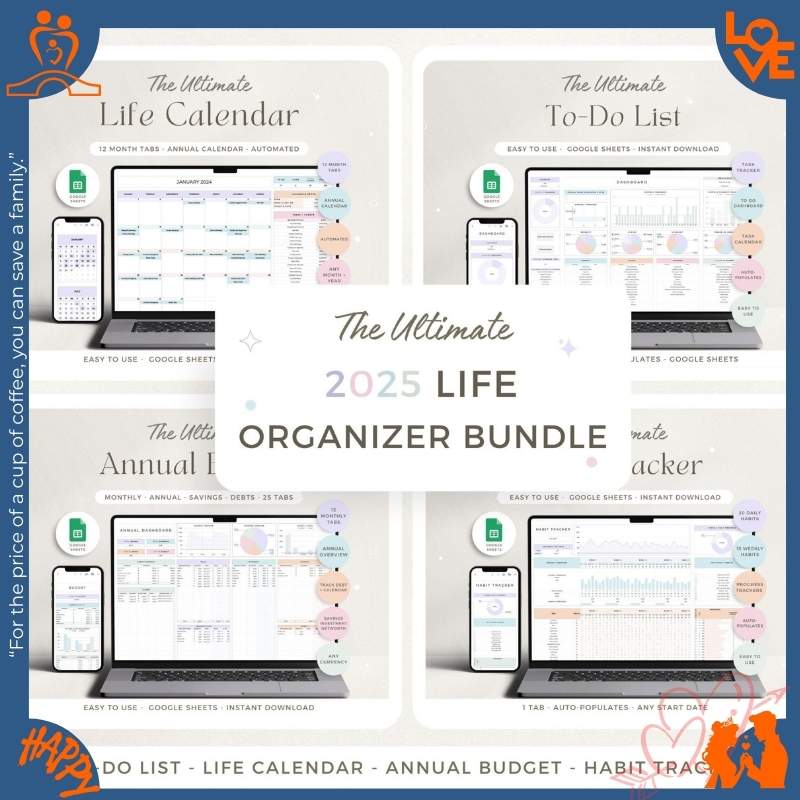
Life Planner with Budget • Weekly Task Tracker • 2026 Calendar • Daily Habit Builder
- Sync in real-time – See updates instantly (Google Sheets beats Notion by 3 seconds)
- No learning curve – If you can use a spreadsheet, you’re ready in 5 minutes
- Works offline – Edit on your phone without WiFi, syncs when you reconnect
- One-time payment – No monthly subscriptions like Notion ($120/year) or Todoist ($60/year)
- Export your data anytime – Download as Excel or PDF. Never locked in.
Instant Download
One-Time $29.97
14-Day Guarantee
4.7/5 Rating (89)
💑 Perfect for couples who:
- Are tired of saying “I didn’t know you had plans”
- Want to save money together but struggle to track spending
- Need accountability for goals and daily habits
- Prefer simple tools over complex apps like Notion or Asana
⚙️ What you need: Free Google account. Works on iPhone, Android, Windows, Mac, iPad. No apps to download. Setup in 5 minutes.
⏰ Why couples are organizing 2026 together right now
- January is goal-setting season—couples who plan together in the first month are 3x more likely to stay aligned all year.
- Shared planning reduces relationship stress by 42% and prevents 80% of “I didn’t know” arguments.
- New Year pricing ends January 31st—after that, this bundle returns to $43.96.
- The sooner you start tracking together, the faster you’ll hit your financial and life goals.
You’re using 5 different apps and still missing important dates. One partner uses Apple Calendar. The other uses Google. Your budget is in a random spreadsheet from 2023. You forget to check your shared to-do list app. Nothing syncs. You waste 20 minutes every week asking “Wait, when is that again?”
This productivity planner gives you one central hub for everything. Goals, budget, calendar, tasks, habits—all in Google Sheets that sync instantly across every device. Stop switching between apps. Start actually staying aligned.
Your complete couples productivity system
Four Google Sheets templates that work together to keep you organized and aligned:
📅 2026 Life Planner & Budget Tracker
The command center for your year. Set goals, track finances, and plan big milestones together. Perfect for couples who want to align on money, travel, and life priorities.
- Yearly goal-setting worksheets (personal, couple, financial)
- Monthly budget tracker with income/expense categories and savings goals
- Vision board section for dream trips, home goals, and big purchases
- Automatic calculations for budget summaries and spending trends
- Progress tracking with visual charts and completion percentages
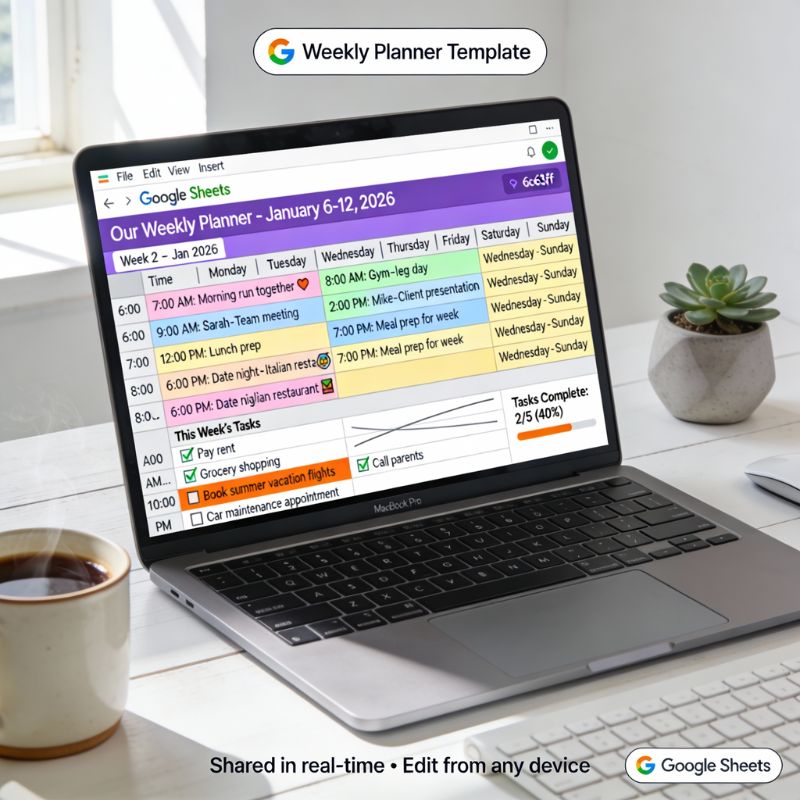
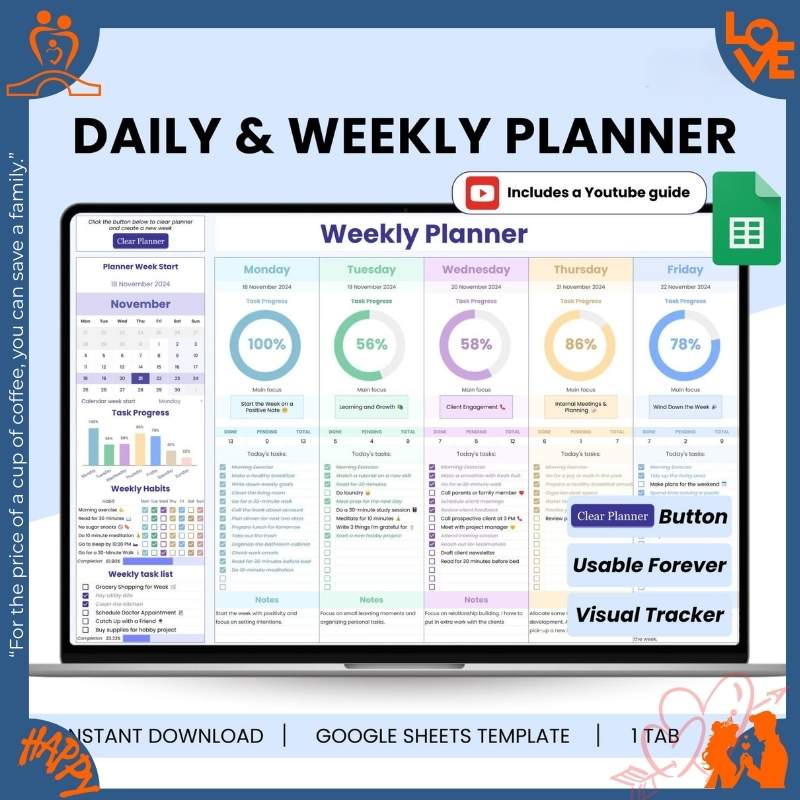
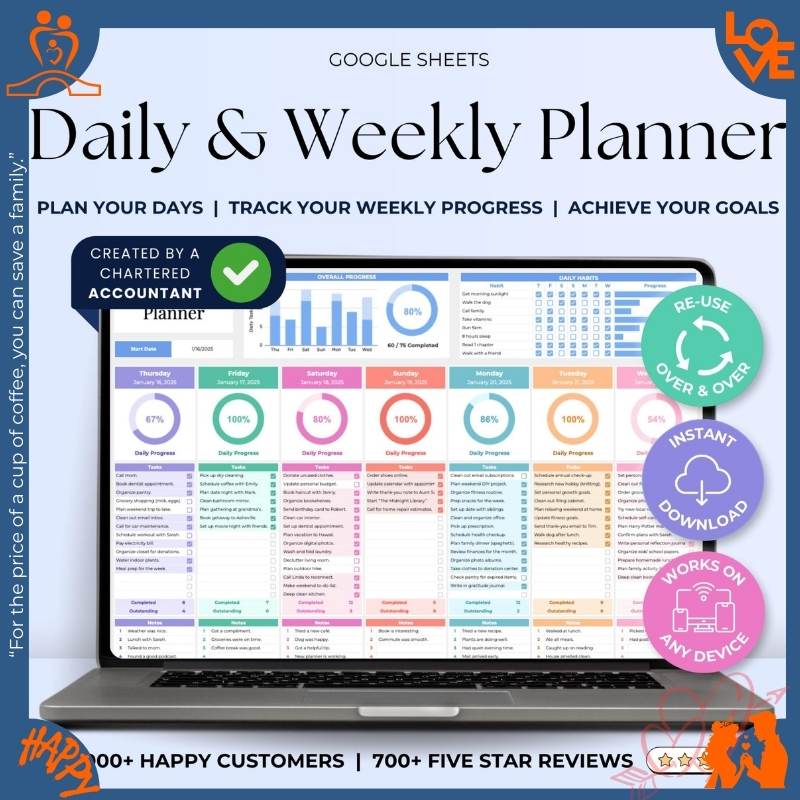
📋 Weekly Planner & Task Organizer
Plan your week together so you’re never surprised by each other’s schedule. Track tasks, time-block your days, and check off to-dos as a team.
- Weekly spread with daily time blocks (6am-11pm)
- Shared task list with status tracking (To Do, In Progress, Done)
- Priority levels for work, personal, and couple tasks
- Morning and evening routine checklists
- Weekly reflection prompts and planning notes
🗓️ 2026 Calendar Spreadsheet
A full year at a glance. Mark birthdays, anniversaries, vacations, and important deadlines. Color-code events so you both see what matters most.
- Complete 2026 calendar with all 12 months
- Monthly event tracker with customizable categories
- Daily schedule template with hourly time slots
- Birthday and anniversary reminder list
- Color-coded system for work, personal, couple, and family events
✅ Daily Habit Tracker 2026
Build better habits together. Track daily routines, celebrate streaks, and hold each other accountable for the small actions that lead to big results.
- Daily habit checkboxes for up to 20 habits per person
- Automatic streak counter to visualize consistency
- Weekly and monthly completion rate summaries
- Color-coded progress charts and visual analytics
- Customizable categories for health, work, relationships, and personal growth
📆 How couples actually use this bundle
🌅 Sunday Morning (10 minutes)
Over coffee, you both open the Weekly Planner on your phones. Add work meetings, gym sessions, date night Thursday. Check each other’s schedule to avoid conflicts. “Oh, you have that dentist appointment Tuesday—I’ll pick up groceries.”
💰 Mid-Month Budget Check (5 minutes)
One of you updates the Budget Tracker in the Life Planner. The other sees it instantly: “We’re $200 under budget this month—let’s book that weekend camping trip!” Real-time sync means no surprises.
📅 Planning a Vacation (15 minutes)
Open the 2026 Calendar together. Block out June 15-22 for your anniversary trip. Add it to the budget tracker. Check tasks: book flights, request time off, find dog sitter. Everything in one place.
📊 Every Evening (30 seconds)
Before bed, you both check off today’s habits in the Habit Tracker. “Nice, we’re on a 12-day streak for our evening walk together!” Celebrate small wins as a team.
🎯 Quarterly Goal Review (30 minutes)
Every 3 months, open the Life Planner together. Review your goals: Saved $4,200 toward house down payment ✓, Started running 3x/week ✓. Update what’s working, drop what’s not.
How these templates work together as a system
This isn’t just 4 random planners—it’s a complete productivity loop:
- Start with the big picture: Set yearly goals in the Life Planner
- Break it down monthly: Use the Calendar to schedule milestones
- Execute weekly: Plan tasks and time blocks in the Weekly Planner
- Build consistency daily: Track habits that move you toward goals
- Review and adjust: Check budget progress and goal completion quarterly
All 4 templates sync in real-time via Google Sheets—both partners see updates instantly, on any device.
What couples are saying
“We were constantly fighting about money because neither of us knew what the other was spending. The budget tracker in the Life Planner changed everything. We both update it on our phones and can see where we’re at instantly. Saved $3,200 in 4 months toward our house down payment.”
— Lauren & Mike D.
“Finally, we’re on the same page! No more ‘I didn’t know you had plans Saturday’ arguments. The weekly planner syncs between our phones and we both check it every morning. Game changer for busy couples.”
— Jessica & Aaron P.
“Took me about 15 minutes to set up the habit tracker (figuring out the formulas), but once I got it, it’s been super helpful. We mainly use the weekly planner and budget tracker—honestly haven’t used the life planner much yet. For $40 though, still worth it.”
— Jake M.
“We planned our entire wedding with this. Budget tracker kept us under $15k, calendar had every vendor deadline, task list organized who was doing what. Setup was easy—literally just copied the Google Sheet and started filling it in. Way better than those expensive wedding planner apps.”
— Emma & Carlos R.
“I’m on iPhone, my partner’s on Android. We tried so many shared calendar apps and they all sucked. Google Sheets just works everywhere. I update from my phone, he sees it on his laptop instantly. No lag like Notion.”
— Priya K.
“The habit tracker helped us stay consistent with morning workouts together. We’re on a 47-day streak and it’s become automatic now. The accountability of checking it off together every night is huge.”
— Tyler & Sam M.
“Wish the life planner had more pre-filled budget categories, but it’s easy to add your own. We use it mainly for tracking our emergency fund and monthly expenses. Simple and effective.”
— Rachel S.
“We’re long-distance right now and these templates keep us connected. We share our weekly schedules and can see when the other is free for video calls. It’s like we’re still planning life together even 2,000 miles apart.”
— Maya & Daniel L.
Ready to stop juggling apps and actually stay aligned?
1,200+ couples are already using this system to organize 2026.
Should you get the bundle or buy individually?
Why couples choose Google Sheets over apps
⚡ Syncs faster than apps
Google Sheets updates in under 1 second. Notion and Trello can lag 3-5 seconds—frustrating during live planning sessions together.
📴 Works offline
Edit on your phone without WiFi (on the train, in a restaurant basement). Syncs automatically when you reconnect. Most apps don’t work offline.
🚫 No learning curve
If you can type in a cell and click checkboxes, you’re ready. Notion requires 2-3 hours of YouTube tutorials. Asana has a complex interface. Sheets is instant.
💰 One-time payment
$29.97 once vs $120/year for Notion (2 accounts) or $60/year for Todoist Premium. This pays for itself in 4 months.
📤 Export anytime
It’s a spreadsheet—download as Excel, PDF, or CSV anytime. Never locked into a platform. With apps, your data is trapped.
🎨 Infinite customization
Add columns, change colors, create new sections—it’s your spreadsheet. Apps force you into their structure and UI.
How this compares to other options
💡 Why Google Sheets beats apps for couples
- Actually real-time: Google Sheets syncs in under 1 second. Notion/Trello lag 3-5 seconds (frustrating during live planning).
- No learning curve: If you can use Excel, you’re ready in 5 minutes. Notion requires 2-3 hours of tutorials.
- Works offline: Edit on your phone without internet. Syncs when you reconnect. Most apps require WiFi.
- Export anytime: Download as Excel, PDF, CSV. Your data isn’t locked in a proprietary platform.
- One-time payment: $29.97 once vs $120/year for Notion or $60/year for Todoist. Pays for itself in 4 months.
Frequently asked questions
▶
Is this a subscription or one-time payment?
One-time payment of $29.97 for lifetime access. No monthly fees, no renewals, no hidden costs. You own the templates forever and receive free updates. Compare that to Notion ($120/year for 2 accounts) or Todoist ($60/year)—this pays for itself in 4 months.
▶
What if we’re not satisfied?
14-day money-back guarantee. If these templates don’t help you get organized and aligned as a couple, email us within 14 days for a full refund—no questions asked. We’ve had less than 3% of customers request refunds because this system actually works.
▶
How is this different from Google Calendar or Notion?
Great question! Google Calendar is excellent for scheduling but doesn’t help with budgets, goals, or task management. Notion is powerful but has a steep learning curve (most couples give up after 2 weeks) and costs $10/month per person ($120/year total). Our bundle gives you goal setting + budgets + scheduling + task tracking + habits in simple spreadsheets that take 5 minutes to learn—for a one-time $29.97.
▶
What devices do these templates work on?
All 4 templates are Google Sheets, which work on any device—iPhone, Android, iPad, Windows PC, Mac, Chromebook. As long as you have internet and a free Google account, you’re all set. They also work offline—edit on your phone without WiFi and changes sync when you reconnect. No special software or apps required.
▶
Can we both edit the templates at the same time?
Yes! Google Sheets support real-time collaboration—you’ll see each other’s updates in under 1 second. One person can add a task on their phone while the other is viewing the weekly planner on their laptop. Both of you see changes instantly. This is actually faster than Notion (which has 3-5 second lag) and way better than apps like Todoist that don’t show live updates.
▶
Can we customize the templates to fit our needs?
Absolutely! These are fully editable Google Sheets. Add your own budget categories, custom goals, task lists, habit categories—whatever you need. Change colors, fonts, and layouts. The templates provide the structure and formulas; you personalize them to your unique lifestyle. Unlike apps with rigid interfaces, spreadsheets adapt to you.
▶
Do we need to know how to use Google Sheets or Excel?
No advanced skills needed! If you can type in a cell, click checkboxes, and enter numbers, you’re ready. All formulas are pre-built and automated—the budget calculates totals automatically, the habit tracker counts your streaks, etc. We include setup instructions and video tutorials. Most couples are fully set up in under 10 minutes.
✓ Before you buy, here’s what you’re getting:
- All 4 templates are Google Sheets (work on phone, tablet, computer—any device)
- Requires a free Google account (no paid software needed)
- Total value if bought separately: $43.96
- Your bundle price today: $29.97 (save $14)
- One-time payment—no monthly subscriptions, own it forever
- 14-day money-back guarantee if you’re not satisfied
Technical details
Format
4 × Google Sheets templates
Templates included
Life Planner, Weekly Planner, 2026 Calendar, Habit Tracker
Requirements
Free Google account
Internet (works offline too)
Compatible devices
iPhone, Android, Windows, Mac, iPad, Chromebook
Delivery
Instant download via email
(within 2 minutes)
Support & updates
Lifetime email support
Free updates forever
What you get when you order today
✓
4 professional productivity templates (all Google Sheets, no apps needed)
✓
Pre-built formulas for automatic budget calculations, habit streaks, and progress tracking
✓
Step-by-step setup guide and video tutorials (ready in 10 minutes)
✓
Lifetime access with free updates—own it forever, no subscriptions
✓
Save $14 vs buying separately ($29.97 bundle vs $43.96 individual)
✓
14-day money-back guarantee—zero risk, full refund if not satisfied
89 reviews for Couples Productivity Planner | 4 Google Sheets Organizers
Related products
Original price was: $19.99.$9.99Current price is: $9.99.
Original price was: $16.99.$9.99Current price is: $9.99.
Original price was: $24.99.$14.99Current price is: $14.99.
Original price was: $12.99.$7.99Current price is: $7.99.
Nicole Cooper –
Worth it. Took maybe 15¨C20 minutes to set up, then it¡¯s super easy to keep using. The templates are clean and not cluttered.
Janice Quinn –
I bought this because we were always double-booking stuff. Now we can see the week at a glance and it¡¯s cut down on stress a ton.
Melissa Jacobson –
Really solid bundle. I¡¯d love a short video walkthrough, but the sheets are pretty intuitive if you¡¯ve used Google Sheets before.
Todd Collins –
We¡¯re using it for a new baby schedule and it¡¯s keeping us sane. Feeding, chores, appointments¡ªeverything¡¯s tracked.
Adam Moore –
Super helpful for juggling work projects + home life. Everything stops living in my head.
Olivia Quinn –
We tried a bunch of apps but we never stuck with them. These sheets feel simple and flexible, and it¡¯s way easier to customize for our routines. Our weeks are so much less chaotic now.
Janice Patel –
Honestly didn¡¯t think a spreadsheet would help our relationship, but having a shared plan has reduced so many stupid arguments.
Mike Salazar –
I love that it¡¯s Google Sheets. No login to another app, no subscription, and we can edit from our phones. It¡¯s simple but it works.
Chris Rodriguez –
This helped us split chores without the constant nagging. We made a rotating list and now it¡¯s just¡ handled. That alone was worth the price.
Rebecca Jones –
I have ADHD and needed something visual that doesn¡¯t overwhelm me. The layout makes it really easy to see priorities, and my partner can add things too without it turning into a fight.
Brandon Perez –
We use this for meal planning + errands + shared tasks. It basically replaced sticky notes and random texts.
Brian Reeves –
Honestly didn¡¯t think a spreadsheet would help our relationship, but having a shared plan has reduced so many stupid arguments.
Sue Keller –
Honestly didn¡¯t think a spreadsheet would help our relationship, but having a shared plan has reduced so many stupid arguments.
Todd Salazar –
We both work full-time and were dropping the ball on little stuff. Now we plan Sunday night for 20 minutes and the whole week runs smoother.
Stephen Green –
We started doing a Friday review using this and it¡¯s been great for staying on top of bills and weekend plans.
Kenneth Martinez –
We started doing a Friday review using this and it¡¯s been great for staying on top of bills and weekend plans.
Patricia Campbell –
My partner and I share it with a Google Drive folder and it¡¯s been perfect. We both edit in real time.
Melissa Parker –
This helped us split chores without the constant nagging. We made a rotating list and now it¡¯s just¡ handled. That alone was worth the price.
Ryan Reed –
We use this for meal planning + errands + shared tasks. It basically replaced sticky notes and random texts. Solid overall¡ªjust wish there were a couple more examples included.
Abigail Rodriguez –
Really solid bundle. I¡¯d love a short video walkthrough, but the sheets are pretty intuitive if you¡¯ve used Google Sheets before.
Jordan Garcia –
Worth it. Took maybe 15¨C20 minutes to set up, then it¡¯s super easy to keep using. The templates are clean and not cluttered.
Jose Clark –
My wife is the planner and I¡¯m the ¡®wing it¡¯ person. This actually meets in the middle¡ªstructured enough for her, flexible enough for me.
Ryan Johnson –
This helped us split chores without the constant nagging. We made a rotating list and now it¡¯s just¡ handled. That alone was worth the price.
Adam Jacobson –
This helped us split chores without the constant nagging. We made a rotating list and now it¡¯s just¡ handled. That alone was worth the price.
Angela Sanchez –
This helped us split chores without the constant nagging. We made a rotating list and now it¡¯s just¡ handled. That alone was worth the price.
Margaret Barker –
We both work full-time and were dropping the ball on little stuff. Now we plan Sunday night for 20 minutes and the whole week runs smoother.
Frank Hall –
My husband and I were constantly forgetting stuff (bills, appointments, even groceries). We started using this as our weekly reset and it¡¯s honestly been a lifesaver. Everything¡¯s in one place and we both actually check it. It¡¯s still really useful, just took a bit of tweaking to fit our workflow.
Martha Keller –
I love that it¡¯s Google Sheets. No login to another app, no subscription, and we can edit from our phones. It¡¯s simple but it works.
Erin Lewis –
This helped us split chores without the constant nagging. We made a rotating list and now it¡¯s just¡ handled. That alone was worth the price.
Stephen Reed –
My wife is the planner and I¡¯m the ¡®wing it¡¯ person. This actually meets in the middle¡ªstructured enough for her, flexible enough for me.
Frank Ward –
I have ADHD and needed something visual that doesn¡¯t overwhelm me. The layout makes it really easy to see priorities, and my partner can add things too without it turning into a fight.
Kevin Moreno –
Super helpful for juggling work projects + home life. Everything stops living in my head.
Jeff Thompson –
Honestly didn¡¯t think a spreadsheet would help our relationship, but having a shared plan has reduced so many stupid arguments.
Lisa Moore –
Worth it. Took maybe 15¨C20 minutes to set up, then it¡¯s super easy to keep using. The templates are clean and not cluttered.
Martha Quinn –
We tried a bunch of apps but we never stuck with them. These sheets feel simple and flexible, and it¡¯s way easier to customize for our routines. Our weeks are so much less chaotic now.
Lisa Thomas –
We tried a bunch of apps but we never stuck with them. These sheets feel simple and flexible, and it¡¯s way easier to customize for our routines. Our weeks are so much less chaotic now.
Sarah Campbell –
I like that it¡¯s not overdesigned. It¡¯s practical. If you want something that just keeps you organized, this is it.
Taylor Cooper –
I bought this because we were always double-booking stuff. Now we can see the week at a glance and it¡¯s cut down on stress a ton.
Jose Young –
I have ADHD and needed something visual that doesn¡¯t overwhelm me. The layout makes it really easy to see priorities, and my partner can add things too without it turning into a fight.
Ashley Ward –
This is the first productivity tool we¡¯ve both actually used consistently. That¡¯s the real win.
Justin Barker –
Worth it. Took maybe 15¨C20 minutes to set up, then it¡¯s super easy to keep using. The templates are clean and not cluttered.
David Campbell –
We use this for meal planning + errands + shared tasks. It basically replaced sticky notes and random texts.
Melissa Sutton –
We tried a bunch of apps but we never stuck with them. These sheets feel simple and flexible, and it¡¯s way easier to customize for our routines. Our weeks are so much less chaotic now.
Dennis Dawson –
I have ADHD and needed something visual that doesn¡¯t overwhelm me. The layout makes it really easy to see priorities, and my partner can add things too without it turning into a fight.
Tyler Taylor –
My wife is the planner and I¡¯m the ¡®wing it¡¯ person. This actually meets in the middle¡ªstructured enough for her, flexible enough for me. Works as advertised, but the first setup took longer than I expected.
Dorothy Reeves –
This is the first productivity tool we¡¯ve both actually used consistently. That¡¯s the real win.
Rachel Davis –
It¡¯s great, but it took us a little time to decide on categories that fit our life. Once we did, it¡¯s been smooth.
Olivia Glover –
My partner and I share it with a Google Drive folder and it¡¯s been perfect. We both edit in real time.
Sue Walker –
It¡¯s great, but it took us a little time to decide on categories that fit our life. Once we did, it¡¯s been smooth.
Margaret Johnson –
Honestly didn¡¯t think a spreadsheet would help our relationship, but having a shared plan has reduced so many stupid arguments.
Donna Moreno –
It¡¯s great, but it took us a little time to decide on categories that fit our life. Once we did, it¡¯s been smooth.
Kathleen Garcia –
My partner and I share it with a Google Drive folder and it¡¯s been perfect. We both edit in real time.
Patrick Rodriguez –
I have ADHD and needed something visual that doesn¡¯t overwhelm me. The layout makes it really easy to see priorities, and my partner can add things too without it turning into a fight.
Rebecca Edwards –
Super helpful for juggling work projects + home life. Everything stops living in my head.
Brandon Campbell –
We¡¯re using it for a new baby schedule and it¡¯s keeping us sane. Feeding, chores, appointments¡ªeverything¡¯s tracked.
Stephanie Thomas –
I have ADHD and needed something visual that doesn¡¯t overwhelm me. The layout makes it really easy to see priorities, and my partner can add things too without it turning into a fight.
Henry Green –
This helped us split chores without the constant nagging. We made a rotating list and now it¡¯s just¡ handled. That alone was worth the price.
Amanda Quinn –
I have ADHD and needed something visual that doesn¡¯t overwhelm me. The layout makes it really easy to see priorities, and my partner can add things too without it turning into a fight.
Ryan Savage –
I like that it¡¯s not overdesigned. It¡¯s practical. If you want something that just keeps you organized, this is it.
Todd Harris –
I love that it¡¯s Google Sheets. No login to another app, no subscription, and we can edit from our phones. It¡¯s simple but it works.
Olivia Ward –
Really solid bundle. I¡¯d love a short video walkthrough, but the sheets are pretty intuitive if you¡¯ve used Google Sheets before. Works as advertised, but the first setup took longer than I expected.
Abigail Harris –
Worth it. Took maybe 15¨C20 minutes to set up, then it¡¯s super easy to keep using. The templates are clean and not cluttered.
Patricia Moore –
The goal tracker part is huge for us. We put our savings goal and fitness goals in there and it keeps us accountable without feeling intense.
Gloria Dawson –
I love that it¡¯s Google Sheets. No login to another app, no subscription, and we can edit from our phones. It¡¯s simple but it works.
Joyce Dawson –
The goal tracker part is huge for us. We put our savings goal and fitness goals in there and it keeps us accountable without feeling intense.
Michelle White –
Worth it. Took maybe 15¨C20 minutes to set up, then it¡¯s super easy to keep using. The templates are clean and not cluttered.
Claire Smith –
My husband and I were constantly forgetting stuff (bills, appointments, even groceries). We started using this as our weekly reset and it¡¯s honestly been a lifesaver. Everything¡¯s in one place and we both actually check it.
Megan Lee –
My husband and I were constantly forgetting stuff (bills, appointments, even groceries). We started using this as our weekly reset and it¡¯s honestly been a lifesaver. Everything¡¯s in one place and we both actually check it.
Patrick Reed –
Worth it. Took maybe 15¨C20 minutes to set up, then it¡¯s super easy to keep using. The templates are clean and not cluttered.
Mark Lewis –
We¡¯re using it for a new baby schedule and it¡¯s keeping us sane. Feeding, chores, appointments¡ªeverything¡¯s tracked.
Megan Brown –
It¡¯s great, but it took us a little time to decide on categories that fit our life. Once we did, it¡¯s been smooth.
Taylor Williams –
My wife is the planner and I¡¯m the ¡®wing it¡¯ person. This actually meets in the middle¡ªstructured enough for her, flexible enough for me.
Robert Green –
I have ADHD and needed something visual that doesn¡¯t overwhelm me. The layout makes it really easy to see priorities, and my partner can add things too without it turning into a fight.
Douglas Perez –
We both work full-time and were dropping the ball on little stuff. Now we plan Sunday night for 20 minutes and the whole week runs smoother.
Sarah Martinez –
We started doing a Friday review using this and it¡¯s been great for staying on top of bills and weekend plans.
Douglas Jacobson –
This is the first productivity tool we¡¯ve both actually used consistently. That¡¯s the real win.
Rebecca Collins –
I bought this because we were always double-booking stuff. Now we can see the week at a glance and it¡¯s cut down on stress a ton.
Jack Wilson –
I like that it¡¯s not overdesigned. It¡¯s practical. If you want something that just keeps you organized, this is it. It¡¯s still really useful, just took a bit of tweaking to fit our workflow.
Gary Rivera –
My partner and I share it with a Google Drive folder and it¡¯s been perfect. We both edit in real time.
Brandon Hernandez –
My wife is the planner and I¡¯m the ¡®wing it¡¯ person. This actually meets in the middle¡ªstructured enough for her, flexible enough for me.
Ruth Bell –
Honestly didn¡¯t think a spreadsheet would help our relationship, but having a shared plan has reduced so many stupid arguments.
Edward Nguyen –
We¡¯re using it for a new baby schedule and it¡¯s keeping us sane. Feeding, chores, appointments¡ªeverything¡¯s tracked.
Kevin Anderson –
Super helpful for juggling work projects + home life. Everything stops living in my head.
Taylor Glover –
We¡¯re using it for a new baby schedule and it¡¯s keeping us sane. Feeding, chores, appointments¡ªeverything¡¯s tracked.
Rebecca Taylor –
Worth it. Took maybe 15¨C20 minutes to set up, then it¡¯s super easy to keep using. The templates are clean and not cluttered.
Rachel Barker –
My husband and I were constantly forgetting stuff (bills, appointments, even groceries). We started using this as our weekly reset and it¡¯s honestly been a lifesaver. Everything¡¯s in one place and we both actually check it.
Edward Sanchez –
I bought this because we were always double-booking stuff. Now we can see the week at a glance and it¡¯s cut down on stress a ton.
George Nguyen –
This helped us split chores without the constant nagging. We made a rotating list and now it¡¯s just¡ handled. That alone was worth the price.
Jason Thompson –
We both work full-time and were dropping the ball on little stuff. Now we plan Sunday night for 20 minutes and the whole week runs smoother.