Task Tracker Spreadsheet Task Priority Tracker Google Sheets V2.9.5
67% of Workers Burn Out from “No Time for Real Work.” Fix the System, Not Your Willpower.
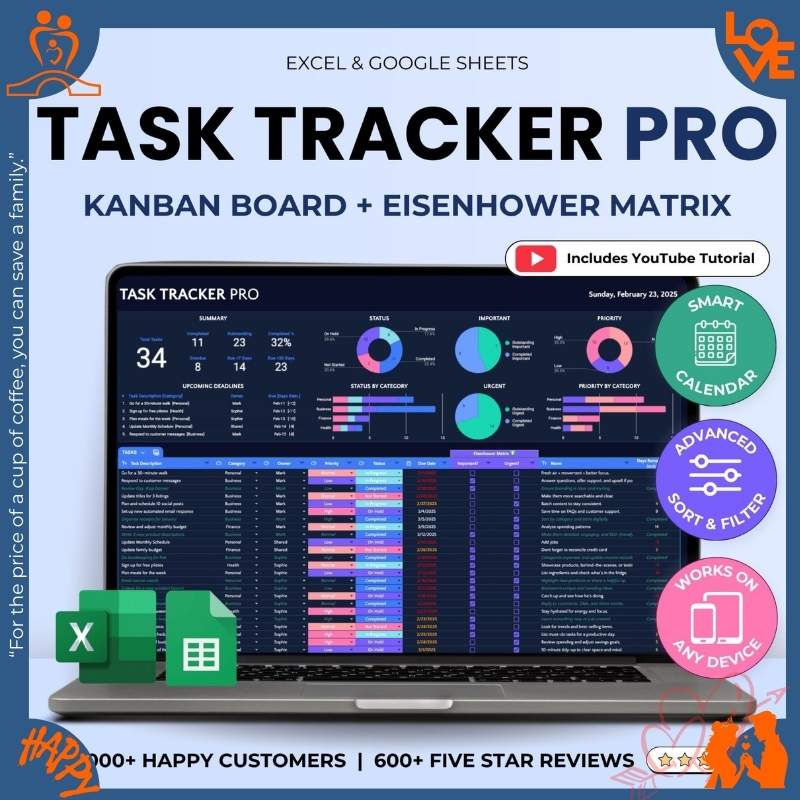
Stop drowning in urgent-but-unimportant tasks. This tracker uses Eisenhower Matrix to separate what’s ACTUALLY important from noise. See all tasks in Kanban view, prioritize with 4-quadrant system, focus on what moves the needle.
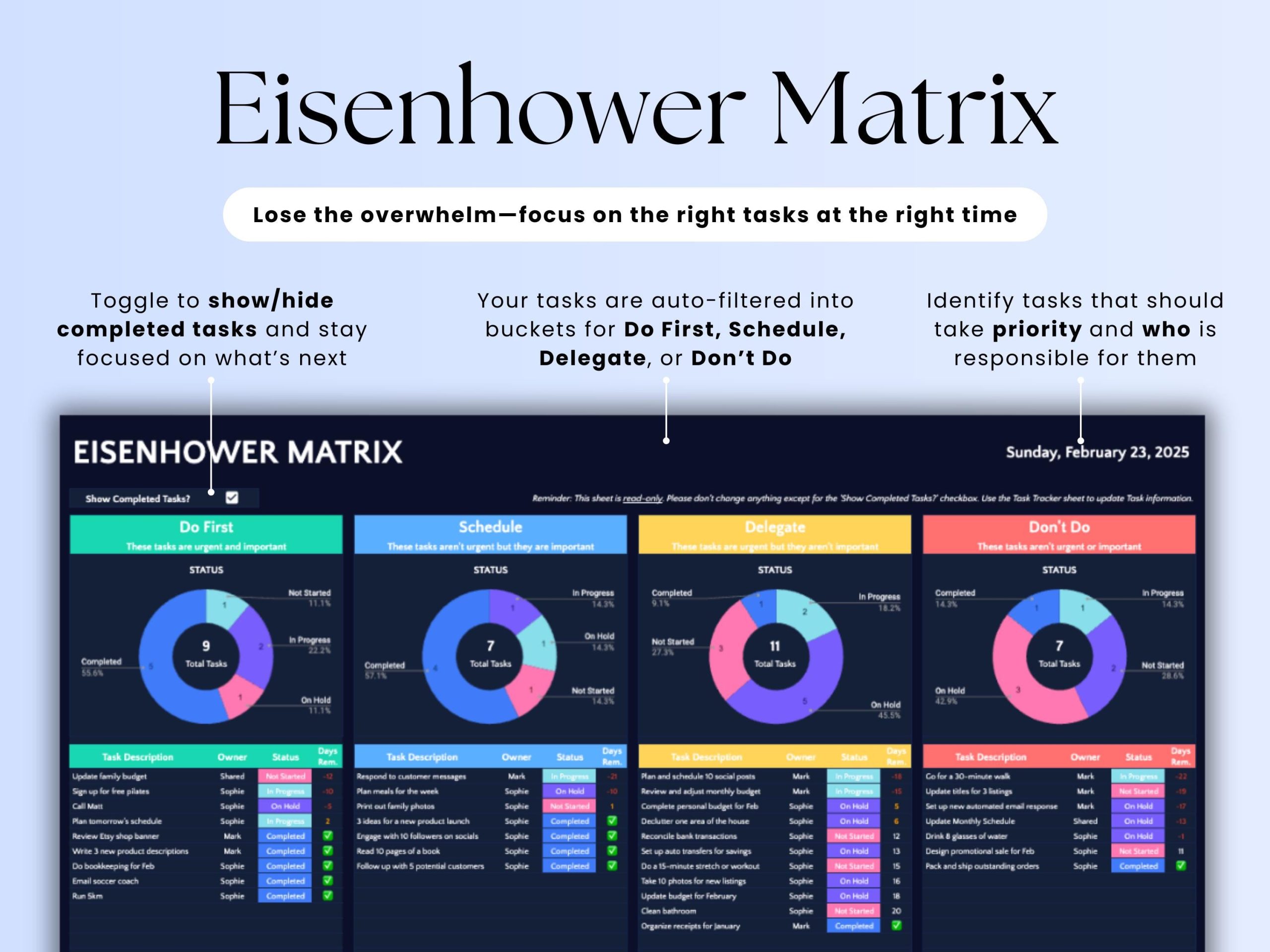
- ✅ Eisenhower Matrix (Important vs Urgent—science-backed prioritization)
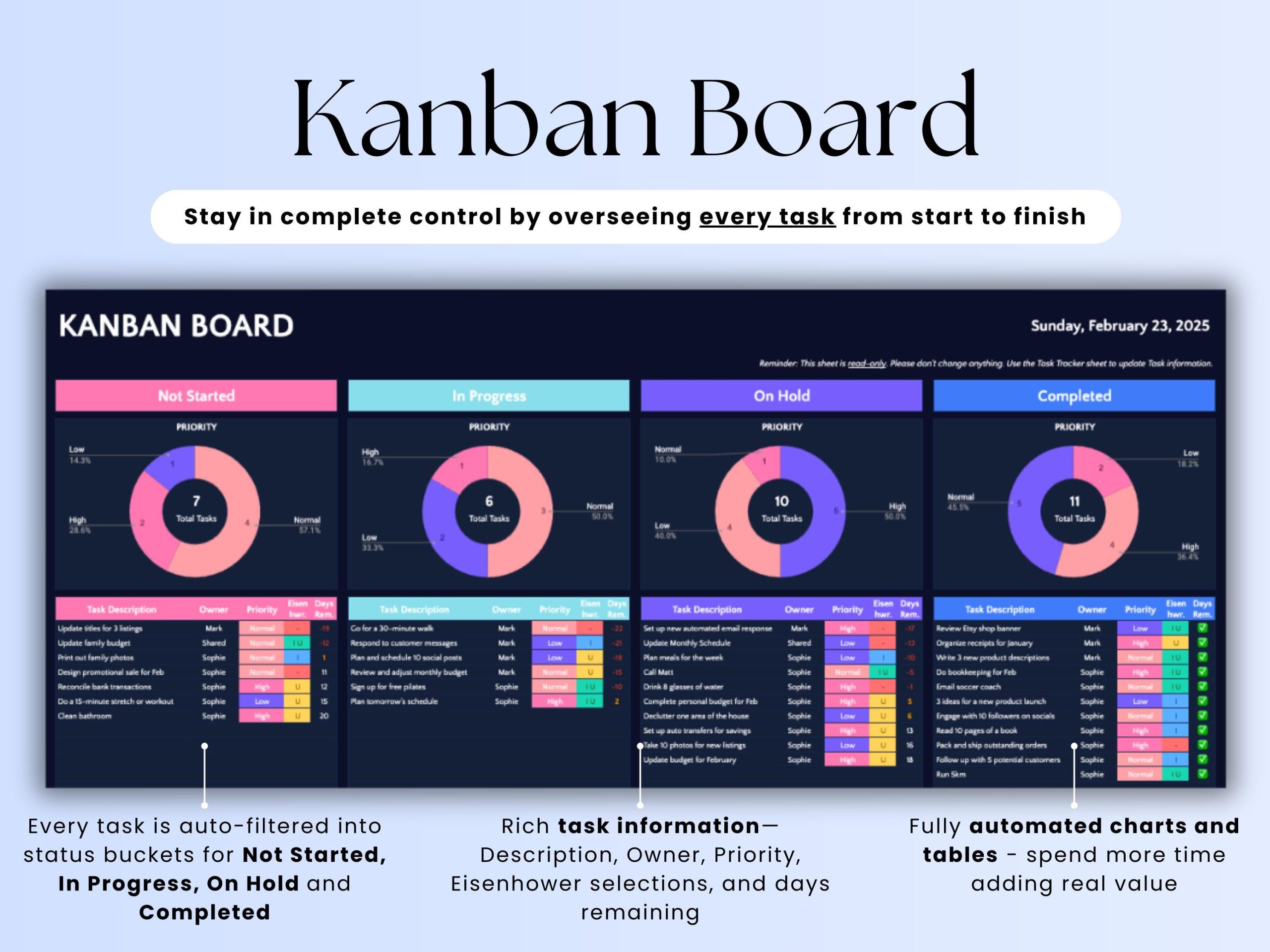
- ✅ Kanban Board (To Do → In Progress → Done visual flow)
- ✅ Track up to 1,000 tasks (but focus on the 20% that matter)
- ✅ Smart filters (show only “Do First” tasks)
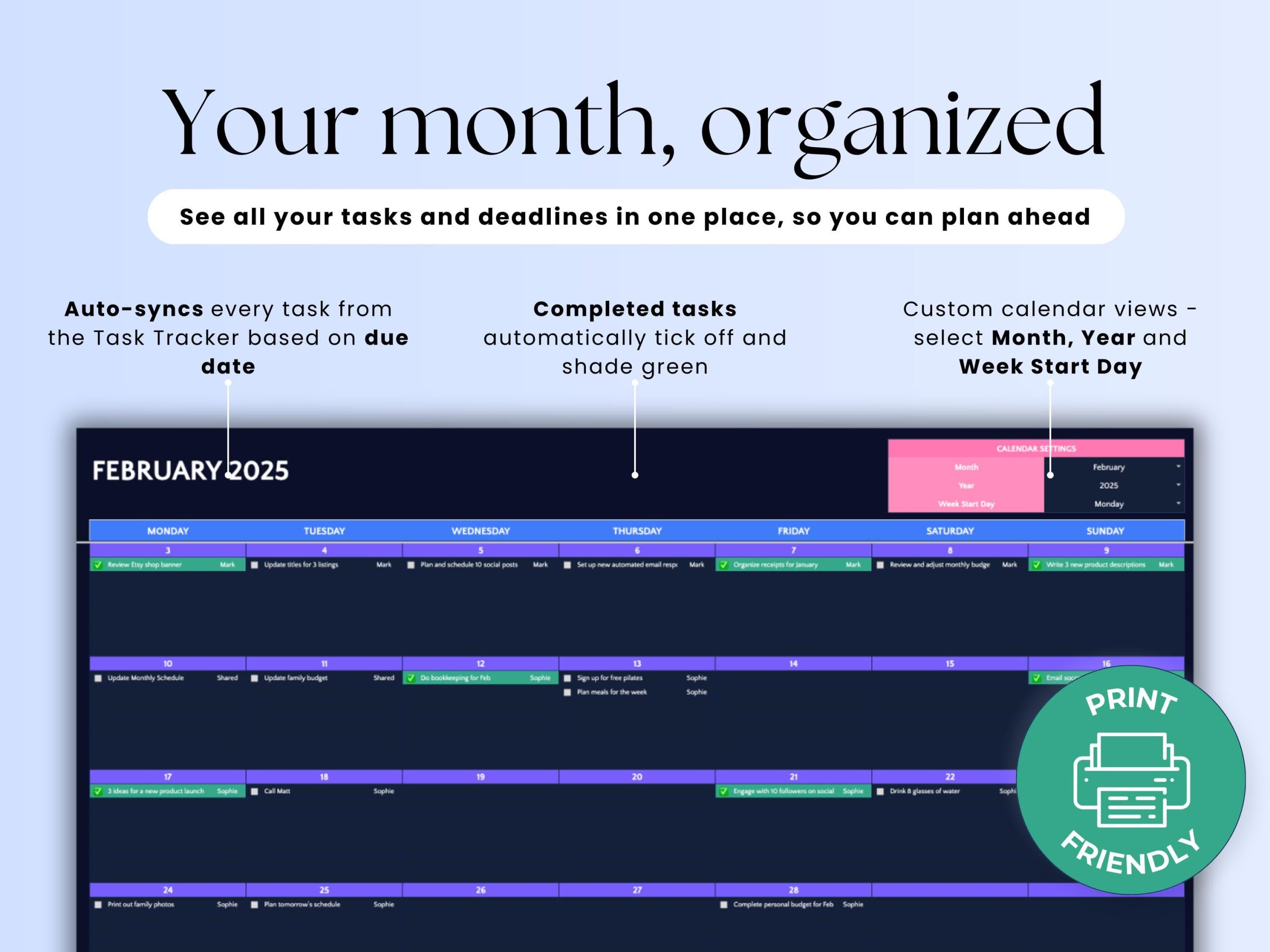
- ✅ Integrated calendar (block time for important work)
- ✅ Team collaboration (share priorities, not chaos)
- ✅ Google Sheets & Excel (no app subscriptions)
- ✅ Video tutorial (set up in 10 minutes)
Perfect for: 2026 productivity goals, overwhelmed professionals, project managers, teams.
$12.99 one-time • Proven frameworks included • No monthly fees
🎯 The Eisenhower Matrix: Why 67% of Workers Feel Overwhelmed
The Problem: Most to-do lists treat all tasks equally. Reality: Only 20% of tasks create 80% of results.
🔥 Q1: DO FIRST
Important + Urgent
• Client crisis
• Deadline tomorrow
• System outage
⚠️ Action: Drop everything
📅 Q2: SCHEDULE
Important + Not Urgent
• Strategic planning
• Skill development
• Relationship building
✅ This is WHERE YOU WIN
👥 Q3: DELEGATE
Not Important + Urgent
• Some emails
• Some meetings
• Interruptions
🤝 Give to someone else
🗑️ Q4: DELETE
Not Important + Not Urgent
• Mindless browsing
• Busy work
• Time wasters
❌ Just say no
📊 Research shows: People who use Eisenhower Matrix report 80% productivity boost and significantly reduced burnout. [web:146][web:149]
This tracker automatically sorts your tasks into these 4 quadrants. You focus on Q2 (Important + Not Urgent) = long-term success.
✅ 2026: THE YEAR YOU FINALLY GET ORGANIZED
Stop Drowning in Tasks. Prioritize What Matters. Achieve More.
Is Your To-Do List a Chaotic Mess?
- You have 47 tasks on your to-do list but no idea which one to start first
- You've tried Asana, Monday, ClickUp, Trello—but they're too complex and you abandoned them after 2 weeks
- Urgent tasks keep derailing your important long-term projects (the "firefighting" trap)
- You write tasks on sticky notes, your phone, random notebooks—everything's scattered
- You work hard all day but somehow the important stuff never gets done
The FamilyBridge Task Tracker brings clarity to chaos. See all your tasks in one place. Know exactly what's urgent vs important. Track progress visually. Finally finish what you start.
Built on Google Sheets—simple enough to actually use daily. Priority matrix shows what to work on first. Works on any device. No $15/month subscriptions.
🎯 Eisenhower Priority Matrix (Built In)
🔥 URGENT + IMPORTANT
Do First (Crises, Deadlines)
🎯 NOT URGENT + IMPORTANT
Schedule (Long-term Goals)
⚡ URGENT + NOT IMPORTANT
Delegate (Interruptions)
🗑️ NOT URGENT + NOT IMPORTANT
Eliminate (Time Wasters)
Auto-sorts tasks by priority. Focus on what actually moves the needle.
✅ Never Wonder "What Should I Work On?" Again
- Priority matrix (urgent vs important quadrants)
- Deadline tracking (never miss another due date)
- Progress visualization (see completion rates)
- Category tags (work, personal, health, etc.)
- Team collaboration (share with colleagues for free)
- $7.99 one-time (vs Asana $11/month = $132/year)
📊 Productivity Science: People who use priority matrices complete 40% more high-impact tasks than those with simple to-do lists. 82% of people don't have a task management system—they keep everything in their head. Those who track tasks report 25% less stress and 38% better work-life balance.
📊 See Your Progress at a Glance
87
Tasks Completed
92%
Completion Rate
3
Overdue Tasks
12
High Priority
Auto-calculated stats. No manual counting.
✨ Features That Actually Help You Get Sh*t Done
🎯 Eisenhower Priority Matrix
4 quadrants: Urgent/Important sorting
Auto-highlights high-priority tasks
Focus on what matters, not what's loud
📅 Deadline Tracking
Add due dates to every task
Auto-sorts by deadline proximity
Color-coded: overdue, due soon, on track
📊 Progress Visualization
See % of tasks completed
Track weekly/monthly productivity
Visual charts show trends
🏷️ Category & Tag System
Organize by: Work, Personal, Health, Finance
Filter view by category
See all work tasks or all personal tasks
✅ Subtask Breakdown
Break big tasks into smaller steps
Check off subtasks as you complete
See progress on complex projects
⏰ Time Estimates
Add estimated time per task
Plan realistic daily schedules
Track actual vs estimated time
🔁 Recurring Tasks
Set daily, weekly, monthly repeats
Perfect for habits and routines
Auto-regenerates after completion
👥 Team Collaboration
Share with unlimited team members (free)
Assign tasks to specific people
Everyone sees real-time updates
📝 Notes & Comments
Add context to each task
Attach links, ideas, instructions
Perfect for detailed project tasks
📱 Mobile-Friendly
Check tasks on phone at coffee shop
Mark complete on the go
Syncs instantly across devices
🌉 Get Organized, Whatever Your Life Stage
📍 Overwhelmed Freelancer/Entrepreneur:
Juggling 5 clients, personal admin, side projects. This tracker shows what's urgent vs important. Focus on revenue-generating work.
"I was drowning in client requests. Priority matrix taught me to say no. Revenue up 40% by focusing on high-value work." — Sarah T., Freelance Designer
📍 Working Parent (Too Much on Your Plate):
Work deadlines, kids' activities, household tasks, doctor appointments. See everything in one place. Stop dropping balls.
"3 kids, full-time job, aging parents. This tracker is the only reason I'm not losing my mind. Nothing falls through cracks." — Jennifer M., Working Mom
📍 Student (Multiple Classes + Side Hustle):
Track assignments, exams, part-time job tasks, extracurriculars. Prioritize studying vs everything else.
"Had 4 classes, 2 part-time jobs, club president. This tracker kept me from failing. GPA went from 2.8 to 3.6." — Mike R., College Student
📍 Team Leader/Manager:
Share with your team. Assign tasks, track delegation, monitor progress. Perfect for 5-20 person teams.
"Manage a team of 12. Shared this tracker instead of paying $132/year/person for Asana. Saves $1,584/year." — David L., Engineering Manager
📍 Side Hustler Building Your Empire:
Full-time job + building a business nights/weekends. Prioritize high-leverage tasks that grow your side hustle.
"Built my side hustle to $5k/month while working full-time. This tracker ensured I worked ON the business, not just IN it." — Lisa K., Side Hustler
💎 Simple Tracker vs Overcomplicated Apps
| Feature | FamilyBridge Task Tracker |
Asana | Monday.com | Pen & Paper |
|---|---|---|---|---|
| Cost (1 Year) | $7.99 once | $132/year | $120/year | ~$10/year |
| Cost (5 Years) | $7.99 total | $660 total | $600 total | $50 total |
| Learning Curve | ✅ 10 minutes | ⚠️ 2-3 hours | ⚠️ 3-5 hours | ✅ Instant |
| Priority Matrix | ✅ Built-in | ⚠️ Custom fields needed | ⚠️ Complex setup | ✅ Manual draw |
| Team Collaboration | ✅ Free unlimited | ✅ Yes (premium) | ✅ Yes (premium) | ❌ Can't share |
| Works Offline | ✅ Full access | ⚠️ Limited | ❌ Requires internet | ✅ Always |
| Mobile Access | ✅ Google Sheets app | ✅ Mobile app | ✅ Mobile app | ❌ Paper only |
| Customizable | ✅ Fully flexible | ⚠️ Some limits | ⚠️ Some limits | ✅ Fully flexible |
✅ FamilyBridge Task Tracker
- 💰 $7.99 once (lifetime)
- ✅ 10-minute learning curve
- ✅ Priority matrix built-in
- ✅ Free unlimited team sharing
- ✅ Works offline fully
- ✅ Mobile-friendly
- ✅ 100% customizable
Asana
- 💰 $132/year ($660 in 5 years)
- ⚠️ 2-3 hour learning curve
- ⚠️ Custom fields for priorities
- ✅ Team features (premium)
- ⚠️ Limited offline
- ✅ Excellent mobile app
- ⚠️ Some customization limits
Monday.com
- 💰 $120/year ($600 in 5 years)
- ⚠️ 3-5 hour learning curve
- ⚠️ Complex priority setup
- ✅ Team features (premium)
- ❌ Requires internet
- ✅ Mobile app
- ⚠️ Visual but complex
Pen & Paper
- 💰 ~$10/year (notebooks)
- ✅ No learning needed
- ✅ Draw your own matrix
- ❌ Can't share digitally
- ✅ Always works
- ❌ Paper only
- ✅ Fully flexible
📦 Complete Task Management System
- ✅ Eisenhower Priority Matrix (urgent/important quadrants)
- ✅ Master Task List (all tasks in one view)
- ✅ Deadline Tracker (due dates, color-coded urgency)
- ✅ Progress Dashboard (completion rates, charts)
- ✅ Category System (work, personal, health, finance, etc.)
- ✅ Subtask Breakdown (break projects into steps)
- ✅ Time Estimates (plan realistic daily workload)
- ✅ Recurring Tasks (daily, weekly, monthly repeats)
- ✅ Team Assignment (delegate tasks to others)
- ✅ Notes & Comments (add context to tasks)
- ✅ Status Tracking (not started, in progress, completed)
- ✅ Weekly Review Template (reflect on productivity)
- ✅ Monthly Stats (tasks completed, trends)
- ✅ Video Tutorial (15-min walkthrough)
- ✅ Mobile-Optimized (Google Sheets app)
- ✅ Lifetime Updates (free forever)
💬 From Chaos to Clarity
"Revenue up 40% by focusing on high-value work."
I'm a freelance designer juggling 5 clients. Always felt busy but broke. The priority matrix showed me I was spending 60% of my time on low-paying clients. Raised rates on high-priority clients, fired 2 low-value ones. Same hours, 40% more revenue. This tracker changed my business.
— Sarah T., 32, Freelance Designer
"GPA went from 2.8 to 3.6 in one semester."
Had 4 classes, 2 part-time jobs, and club president responsibilities. Everything felt urgent. This tracker taught me what's actually important (studying for midterms > club meetings). Prioritized differently. GPA jumped from 2.8 to 3.6. Got into my dream grad school.
— Mike R., 21, College Student
"Saved $1,584/year by ditching Asana."
I manage a team of 12 engineers. Was paying $132/year per person for Asana ($1,584 total). Found this Google Sheets tracker. Shares for free with unlimited people. Does 90% of what Asana did. Team adapted in 2 days. CFO loves me now.
— David L., 38, Engineering Manager
"Built side hustle to $5k/month while working full-time."
I work 9-5, then build my Etsy shop nights/weekends. This tracker ensured I focused on high-leverage tasks (product creation, marketing) not busy work (responding to every DM). Side hustle hit $5k/month in 8 months. Quitting my job next quarter.
— Lisa K., 29, Side Hustler
🛡️ Risk-Free Purchase
❓ Frequently Asked Questions
Isn't Google Sheets too simple for task management?
That's exactly why it works. Asana and Monday are SO complex that 60% of users abandon them within a month. This tracker has all the features you actually need (priority matrix, deadlines, progress tracking) without the overwhelming interface. Simple = you'll actually use it daily. Complex = sits unused after week 2.
Can my team use this together?
Yes! Share with unlimited people for free. Perfect for teams of 2-20 people. Share the Google Sheet with team emails. Everyone sees the same task list in real-time. Assign tasks to specific people. Way cheaper than Asana ($132/person/year). Many small businesses use this to save thousands per year.
What's the Eisenhower Priority Matrix?
The secret to actually getting important things done. It's a 2x2 grid: Urgent vs Not Urgent, Important vs Not Important. Quadrant 1 (urgent + important) = do first. Quadrant 2 (not urgent + important) = schedule these—this is where breakthroughs happen. Quadrant 3 (urgent + not important) = delegate. Quadrant 4 = eliminate time wasters. This tracker auto-sorts tasks into these quadrants.
Do I need to know spreadsheets?
Nope! If you can type, you can use this. Everything is pre-built. You just fill in task names, select priority, add due dates. All formulas and automations work automatically. The 15-minute video tutorial shows exactly what to do. Zero spreadsheet skills required.
Can I access this on my phone?
Absolutely! Mobile-first design. Download the free Google Sheets app (iOS/Android). Open your task tracker, add tasks on the go, mark complete while in line at coffee shop. Everything syncs instantly between phone, tablet, and computer. Most users check their task list 5-10 times per day on mobile.
How is this different from a regular to-do list?
Regular to-do lists don't prioritize. You write 30 tasks and don't know where to start. This tracker FORCES you to label each task as urgent/not urgent, important/not important. The priority matrix automatically shows what to work on first. Plus: deadline tracking, progress stats, team collaboration, time estimates. It's a system, not just a list.
📋 Kanban Board: See Your Work Flow (Not Just Lists)
Problem with to-do lists: You can't see PROGRESS, only completion. Kanban shows WHERE tasks are stuck.
📥 BACKLOG
Ideas waiting
📋 TO DO
Ready to start
⚙️ IN PROGRESS
Working on now
✅ DONE
Completed!
🤔 Task Tracker Pro vs Weekly Planner: Which Do You Need?
| Feature | Weekly Planner | Task Tracker Pro |
|---|---|---|
| Best For | Daily routines | Complex projects |
| Task Capacity | ~50 tasks/week | 1,000+ tasks |
| Prioritization | Manual | Eisenhower Matrix |
| Visualization | Weekly view | Kanban Board |
| Team Collaboration | ⚠️ Limited | ✅ Built-in |
💡 Choose Weekly Planner if: You need daily/weekly routine tracking with habits.
💡 Choose Task Tracker Pro if: You manage projects with 100+ tasks and need team collaboration.
143 reviews for Task Tracker Spreadsheet Task Priority Tracker Google Sheets V2.9.5
Related products
Couples Living Together Bundle | 4 Essential Templates
Rated 4.95 out of 5$37.95Original price was: $37.95.$26.57Current price is: $26.57.2026 Life Planner Google Sheets Planner Digital Organizer Budget Tracker To Do List V1.0.3
Rated 4.20 out of 5$24.99Original price was: $24.99.$14.99Current price is: $14.99.Habit Tracker Daily Weekly Monthly Spreadsheet 2026 Habit Tracking Template V 2.3.4
Rated 4.41 out of 5$13.99Original price was: $13.99.$8.99Current price is: $8.99.Travel Planner Google Sheets, Travel Itinerary, Travel Packing List, Trip Expense Tracker V3.6.5
Rated 4.41 out of 5$15.99Original price was: $15.99.$9.99Current price is: $9.99.



Ronald Dean –
The Task Tracker Pro works fine but doesn¡¯t stand out. (variation 3) Setup was very easy.
Hannah Elliott –
The Task Tracker Pro works fine but doesn¡¯t stand out. (variation 2) Keeps me organized daily.
Taylor Ochoa –
The Task Tracker Pro works fine but doesn¡¯t stand out. (variation 1) Cut my planning time in half.
Wendy Morris –
The Task Tracker Pro was okay but lacked features I hoped for. The bonus planner is helpful.
Brandon Baird –
The Task Tracker Pro brings clarity to my chaotic schedule. Keeps me organized daily.
David Brewer –
The system keeps me consistent. Setup was very easy.
Oscar Jones –
The system is so well organized. Setup was very easy.
Corey Lawrence –
The support team was very helpful. Setup was very easy.
George Davis –
The setup was easy and quick. Great value for the price.
Theodore Foster –
The progress tracking in Task Tracker Pro keeps me motivated every day. Setup was very easy.
Michael Alexander –
The process feels streamlined. I love using it across devices.
Brittney Webster –
The printable planner bonus is amazing. Highly recommended for busy people.
Clarence Brown –
The price is totally fair. The dashboards make planning simple.
Robert King –
The layout is easy to navigate. Setup was very easy.
Robert Smith –
The Kanban view is super handy. The bonus planner is helpful.
Jennifer Sutton –
The Kanban board feature in Task Tracker Pro is a total lifesaver. The bonus planner is helpful.
Ashley Kirby –
The Kanban and calendar features are great additions. Setup was very easy.
Jessica Morton –
The interface is so intuitive. Customizable to my needs.
Keith Russell –
The filters are super helpful. Helps my whole team stay aligned.
Jeanette Hall –
The features save me time daily. Cut my planning time in half.
Matthew Mason –
The features are exactly what I need. The bonus planner is helpful.
Kimberly Gray –
The design is so clean. Great value for the price.
Matthew Wells –
The design is elegant and practical. Highly recommended for busy people.
Dwayne Bowers –
The dashboards make everything clear. Keeps me organized daily.
David Baker –
The dashboard view is clear and simple. Customizable to my needs.
Michael Gardner –
The customization options are great. Great value for the price.
Michael Porter –
The collaboration tools are great. Keeps me organized daily.
Sean Cline –
The collaboration feature is excellent. Setup was very easy.
Brian Williams –
The calendar view is a game-changer. Helps my whole team stay aligned.
Benjamin Fletcher –
The calendar sync is perfect. Great value for the price.