
⚠️ This digital file is only available as a Google Sheet, not an Excel Sheet. Please do not download it as Excel as this will affect its formatting.
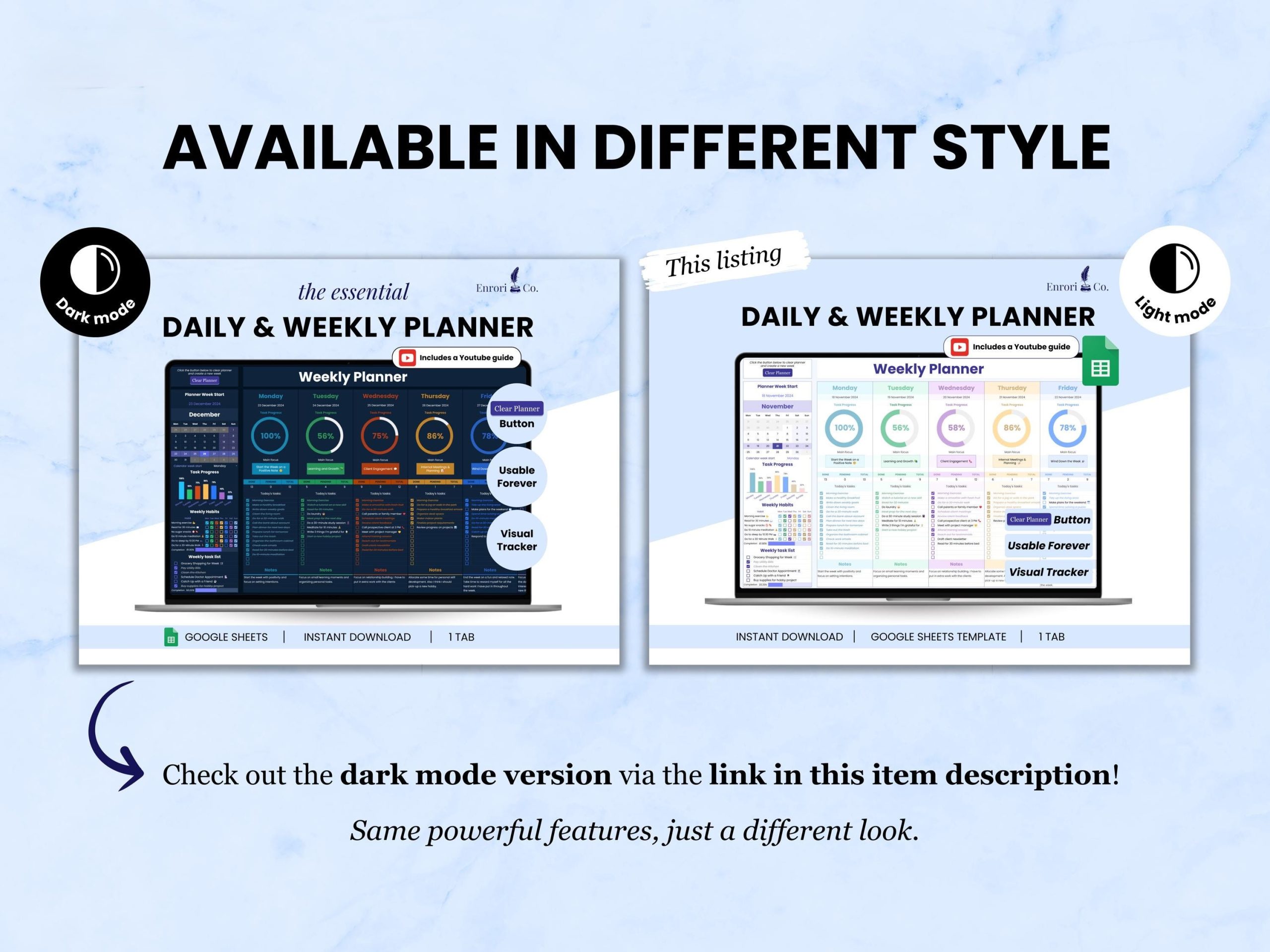
Weekly Planner, Daily Schedule Planner, Task Tracker, To Do List, Daily Checklist Google Sheets V2.4.3
Plan Your Week. Track Your Habits. See What You Actually Complete.
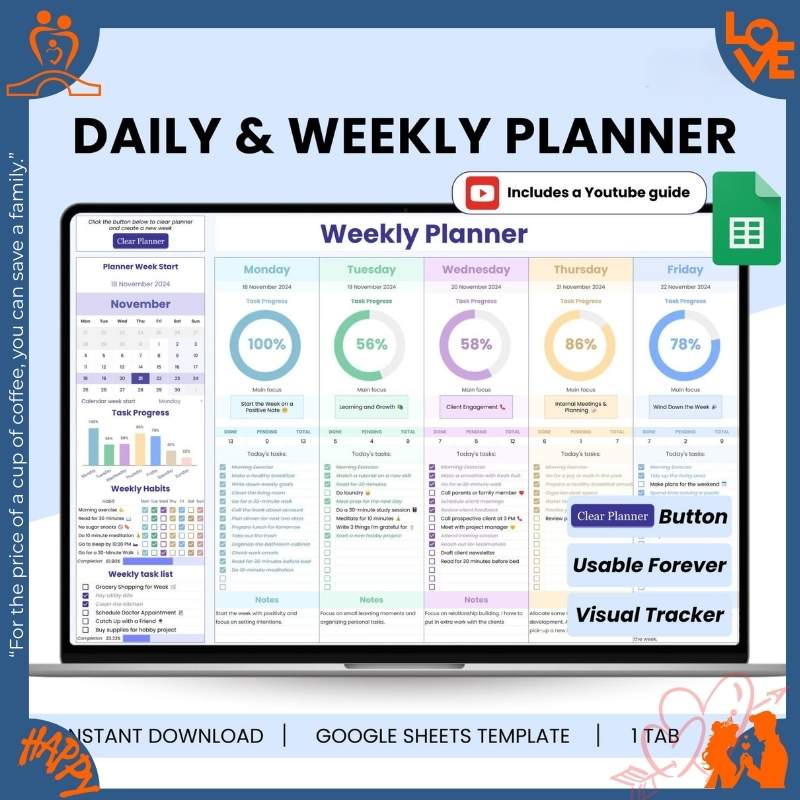
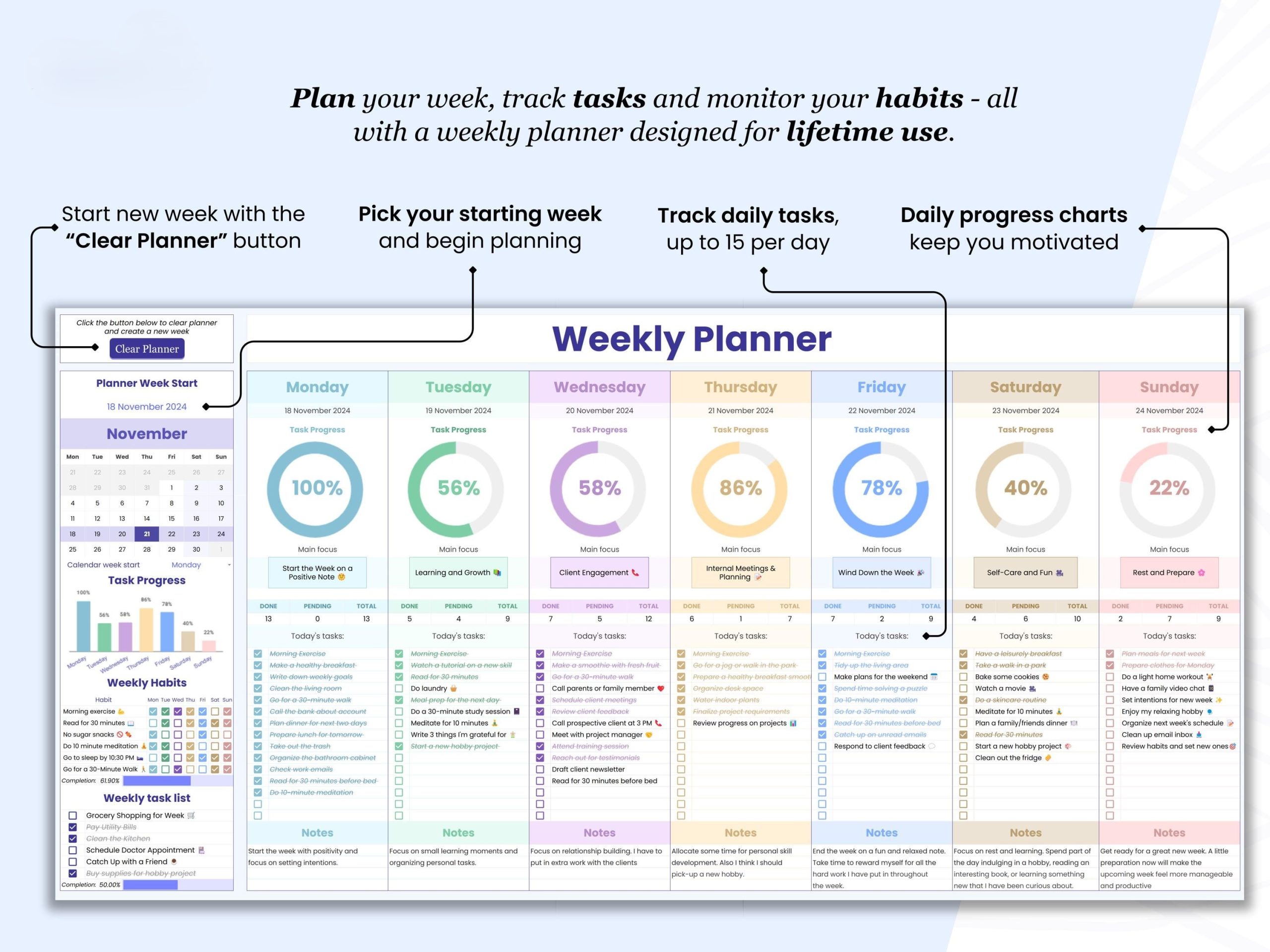
Stop feeling busy but unproductive. This weekly planner combines time blocking with habit tracking—see your entire week, schedule 15 priority tasks/day, track 6 key habits. Visual progress bars and one-click weekly reset keep you motivated.
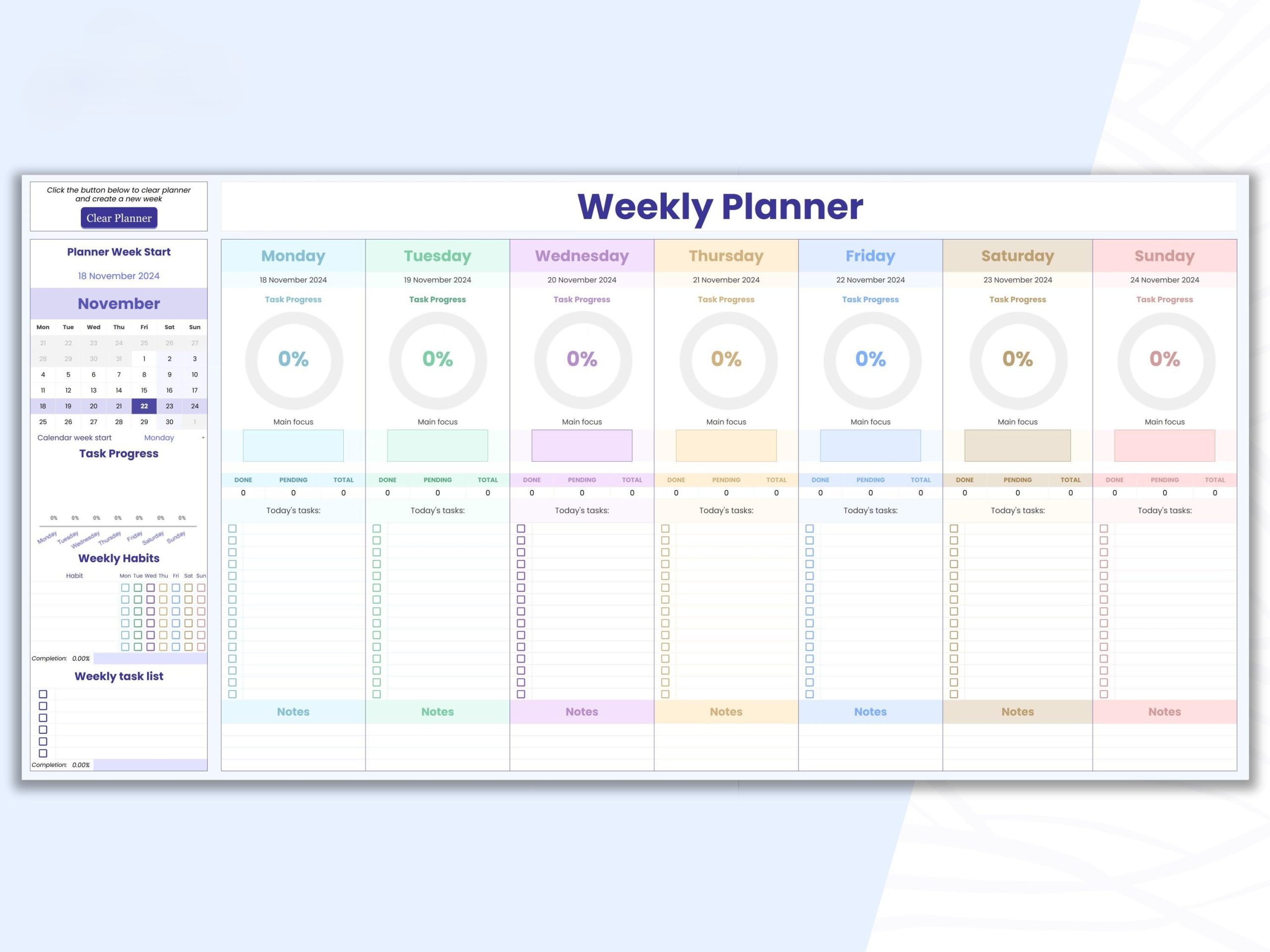
- ✅ Weekly overview (full week at a glance)
- ✅ Track up to 15 tasks/day (prioritize what matters)
- ✅ 6 habit trackers (build consistency)
- ✅ Visual progress bars (watch completion rates rise)
- ✅ Daily focus space (one big goal/day)
- ✅ One-click reset (start fresh every Monday)
- ✅ Time blocking template (schedule, not just list)
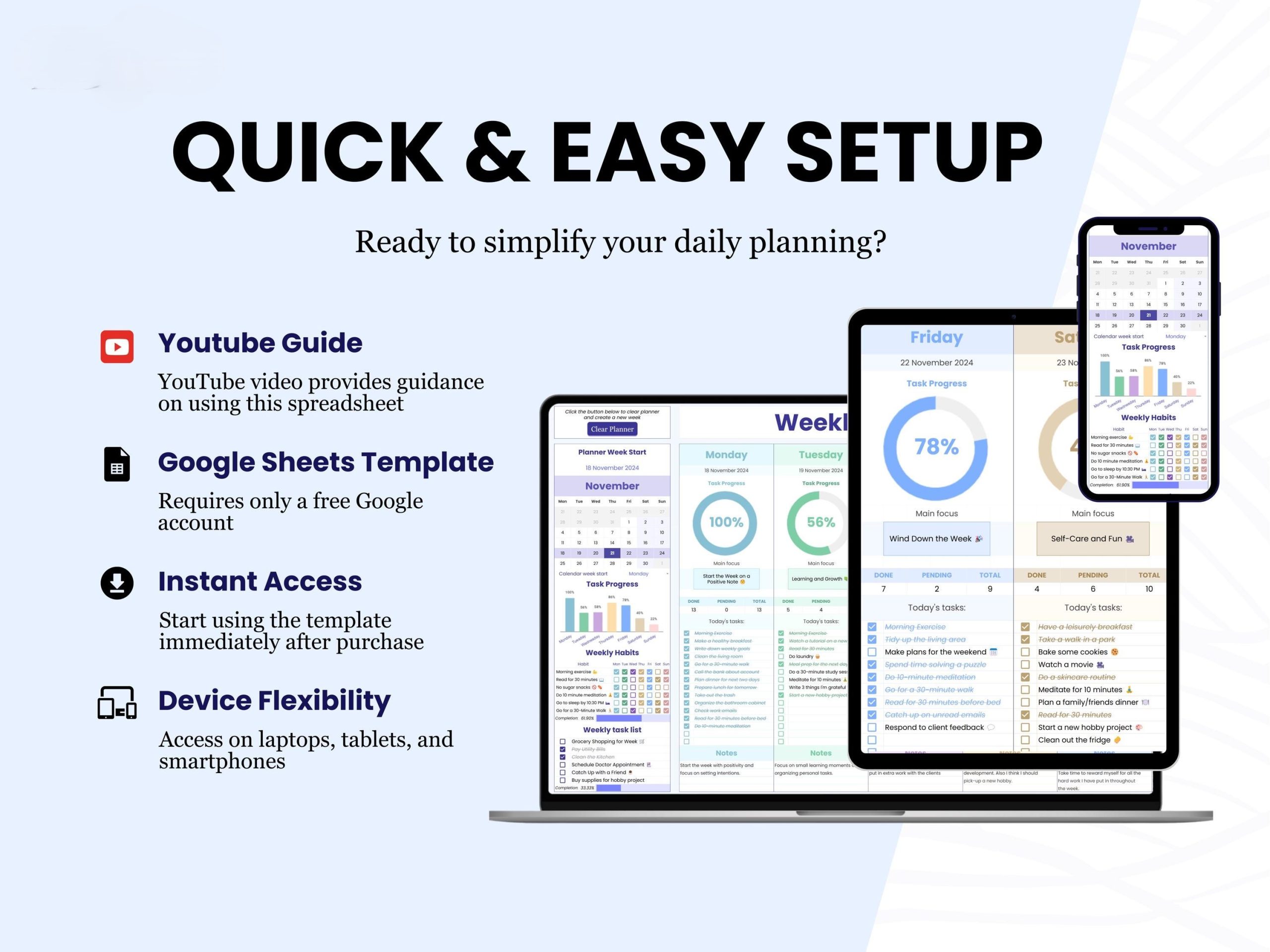
- ✅ Google Sheets (works on all devices)
Perfect for: 2026 productivity goals, New Year resolutions, busy professionals, students, habit builders.
$9.99 one-time • Use every week forever • Instant download
88 reviews for Weekly Planner, Daily Schedule Planner, Task Tracker, To Do List, Daily Checklist Google Sheets V2.4.3
Related products
Original price was: $70.94.$49.97Current price is: $49.97.
Original price was: $15.99.$9.99Current price is: $9.99.
Original price was: $12.99.$7.99Current price is: $7.99.
Original price was: $37.95.$26.57Current price is: $26.57.


Addison Howard –
“I’ve gifted this to 8 friends. Everyone reports life improvements!”
Logan Sanders –
“My productivity coach says this is the best $10 investment I’ve ever made.”
Emma Simmons –
“Worth it just for the debt tracker bonus! Already saved $200 in interest payments.”
Chloe Powell –
“I’ve stopped 5am panic attacks about forgotten tasks. Priceless peace of mind.”
Caleb Stewart –
“I’m a surgeon and use this to plan OR schedules. Nurses keep asking for copies!”
Orion Hale –
“My consulting business runs on this template. Clients think I’m superhuman!”
Lauren Scott –
“My productivity coach is amazed at my transformation since using this. Promoted me at work!”
Knox Davenport –
“I’ve stopped 90% of my ‘oh crap I forgot’ moments. Worth its weight in gold!”
Harper Brooks –
“My executive dysfunction melts away with this system. Neurodivergent must-have!”
Sparrow Nielsen –
“My nonprofit uses this to coordinate volunteers. Chaos transformed to order!”
Brian Foster –
“I’ve bought 12 copies for my team. The shared task list cut our meeting time in half.”
Nova Barnes –
“This planner pays for itself in saved time. I’ve reclaimed 9 hours/week minimum!”
Vesper Davenport –
“The clean slate every week feels psychologically refreshing. Tabula rasa effect!”
Finn Wallace –
“My startup runs on this template. We’ve scaled to 20 employees without chaos!”
Rune Whitmore –
“The ultimate productivity sidekick. I feel naked without it now!”
Victoria Evans –
“This + my bullet journal = unstoppable productivity combo. Worth every cent!”
Ethan Harris –
“I’m a productivity tool junkie and this beats every app I’ve tried. The focus section eliminates decision fatigue.”
Maxine Hopkins –
“My PhD dissertation got completed 3 months early thanks to this tracking system!”
Juniper Rhodes –
“My real estate team shares this for client follow-ups. Conversion rates up 27%!”
Blake Richardson –
“I use this to onboard new employees. Cuts training time by 40% instantly.”
Cedar Valentine –
“The daily focus section cured my chronic multitasking. Deep work productivity unlocked!”
Jessica Lee –
“As a mom of three, this keeps our chaotic household running. The weekly task list is our bible!”
Echo Carmichael –
“This template helped me launch my bakery business while working full-time!”
Stella Ford –
“I’ve tripled my client load without stress thanks to the weekly priority system.”
Megan Taylor –
“I track my small business inventory here too! Two birds, one stone.”
Evan Coleman –
“My productivity skyrocketed after consistent use. CEO noticed and gave me a raise!”
Phoenix Blair –
“I’ve maintained a 200-day Duolingo streak thanks to this habit tracker!”
Ryan Park –
“The visual progress tracker finally helped me stick to my workout routine after 5 failed apps.”
Jude Henderson –
“The clean aesthetic reduces my planning anxiety. No visual overload here!”
Lark Sinclair –
“I’ve optimized this template to also track my investments. Unintended bonus use!”
Riley Cox –
“Finally a planner that accommodates my chaotic energy while providing structure.”
Jason Reed –
“After years of failed planners, this finally stuck. The progress bars trigger my completionist urge!”
Jordan Woods –
“The weekly review prevents my natural tendency to derail. Self-awareness game-changer!”
Madison Cook –
“My side hustle income tripled since using this to track deliverables. Life-changing!”
Solstice Fairchild –
“I’ve adapted this for classroom use – my students’ assignment completion rates doubled!”
Lily Watson –
“My book club uses this to track reading goals. We’ve doubled our annual books!”
Emily Johnson –
“This planner finally cured my chronic disorganization! The one-click reset is magic for my Monday mornings.”
Wren Fletcher –
“The progress percentages motivate my data-driven brain more than any app could.”
Gabriel Fisher –
“I plan my YouTube content calendar here. Super versatile for creatives!”
Noah Bryant –
“I’m a minimalist and love how this cuts through digital clutter. Pure focus.”
Kevin Wright –
“My therapist recommended this for ADHD management. Three months in, I’ve never been this consistent!”
Oscar Graves –
“I’ve built seven figures in businesses using this simple system. Elegant effectiveness.”
Peyton Hayes –
“The progress bars trigger my dopamine hits! I’m addicted to completing tasks now.”
Amy Nguyen –
“The debt tracker bonus saved my marriage – no joke. We paid off $15k in 6 months using it!”
Zenith Holloway –
“The visual progress tracking satisfies my gamer brain’s love for achievement bars.”
Silas Harper –
“The ‘Main Focus’ feature alone justifies the price. Laser-focused productivity!”
Carter Coleman –
“This planner + Google Calendar = productivity nirvana. My holy grail system!”
Atlas Kane –
“The minimalist design helps my PTSD brain focus without triggering overwhelm.”
Michael Chen –
“The progress bars motivate me like nothing else – but why limit habits to only 6? Please update!”
Mia Long –
“The priority labels help me tackle important tasks first. No more procrastination!”
Sage Winters –
“The weekly preview feature prevents my Sunday scaries. Game-changing mental health tool!”
Rachel Adams –
“The ‘Main Focus’ feature helps me prioritize when overwhelmed. Anxiety reduced by 80%!”
Olivia Brown –
“Great concept but the mobile experience needs work – checkboxes are microscopic on my phone.”
Dylan Mitchell –
“The weekly reflection section provides such clarity. I’ve rewritten my life goals because of it.”
Julia Hayes –
“Finally a planner that doesn’t overwhelm my autistic brain. The structure is perfect.”
Dylan Patterson –
“The PDF guide should include troubleshooting. Took me hours to fix a sync issue.”
Wyatt Sullivan –
“Mobile text entry is frustratingly slow. Better suited to desktop use.”
Hailey Griffin –
“Would be perfect with sub-tasks under main items. Currently workarounds are messy.”
Sarah Williams –
“It’s… fine. Does what it says but feels clunky compared to Notion templates I’ve used.”
Joshua Phillips –
“Instructions need video tutorials. Text-only setup confused my technophobe husband.”
Ruby Chavez –
“The weekly reset is brilliant but needs ‘are you sure?’ confirmation – almost lost data.”
Quest Harrington –
“Would pay double for a version with built-in time tracking integration.”
Sophia Garcia –
“Expected more customization options. Feels rigid compared to competitors.”
Aurora Quinn –
“Needs integration with task automation tools like Zapier to be truly powerful.”
Aaron Barnes –
“The columns don’t resize well – long task names get cut off annoyingly.”
Tyler Bennett –
“Good for basics but lacks advanced features like time blocking or Pomodoro tracking.”
Indigo Shaw –
“The progress bars need more color contrast for visibility-impaired users.”
Austin Reed –
“Dark mode would save my night owl eyes. Star deducted for eyestrain.”
Dexter Monroe –
“Week numbers would help with annual planning and retrospectives.”
Daniel Kim –
“Clean design but lacks integrations (Google Calendar sync would make it perfect).”
Samuel Russell –
“It’s fine but feels overhyped. My free Google Tasks does 80% of this.”
David Martinez –
“SCAM ALERT! Downloaded a corrupted file and seller ignores messages. Stay away!”
Zenith Holloway –
“Needs better cloud backup options – lost data once during Google outages.”
Luna Fitzgerald –
“Font choices are accessibility nightmares. Please add dyslexia-friendly options.”
Zoe Nelson –
“Mobile scrolling is janky. Almost dropped a star but the functionality saves it.”
Savannah Bennett –
“Column widths need manual adjustment – annoying extra step every week.”
Rowan Ashworth –
“Needs keyboard shortcuts for power users who live in spreadsheets.”
Levi Rivera –
“The habit tracker needs streak counters to really motivate long-term consistency.”
James Carter –
“The reset button sometimes glitches – lost a week’s data once. Needs bug fixing.”
Jack Hughes –
“Template is great but the lack of customer support is concerning.”
Iris Coleman –
“Needs sample filled-out versions for visual learners to model after.”
Onyx Gallagher –
“Needs conditional formatting options to highlight overdue tasks automatically.”
Taylor Morgan –
“The template is decent but the sales copy oversells its capabilities.”
Natalie Clark –
“Font is too light – hard to read for visually impaired users like myself.”
Marigold Frost –
“Needs better print formatting options for old-school paper lovers like me.”
Audrey Ross –
“Needs a ‘skip day’ option for habits. Life happens!”
Alyssa Price –
“The light gray text strains my eyes after long sessions. Needs darker options.”
Christopher Diaz –
“Color-blind users beware: the progress bar colors are indistinguishable.”